Small Business Marketing Automation: Shopify Founders 2026
By Arthur Falcone · Founder of Arlo
You're probably here because you installed Klaviyo or another ESP, built a basic welcome email, maybe turned on a cart reminder, and expected revenue to start rolling in on autopilot.
Instead, the dashboard looks busy but not useful. A few flows are live. Some emails are getting opens. You still can't answer the only question that matters. Which automations are making you money?
That's the gap with most small business marketing automation advice. It tells founders what exists, not what to build first when time is tight and cash flow matters. If you run a Shopify store with a tiny team, you do not need more ideas. You need an order of operations that protects revenue first and complexity second.
#Table of Contents
- Why Most Marketing Automation On Shopify Fails
- The Revenue-First Automation Roadmap
- Recovering Lost Sales With Abandonment Flows
- Turning New Subscribers Into First-Time Buyers
- Driving Lifetime Value With Post-Purchase Automations
- How to Know If Your Automations Are Actually Working
#Why Most Marketing Automation On Shopify Fails
Most Shopify automation doesn't fail because the tool is weak. It fails because the founder builds flows in the wrong order, with the wrong goal, and with no control system.
A lot of small business marketing automation content still skips the hardest practical question for tiny teams. Which automations should you build first when there are one or two people doing everything? That gap between generic advice and founder reality is called out in this overview of marketing automation for small business teams.
The result is predictable. Founders either underbuild or overbuild.
#The three failure patterns I see most
-
Random acts of automation
You launch a welcome flow, then a birthday flow, then a review request, then a VIP segment, all because the template library made it easy. None of it is tied to revenue priority. -
Bad plumbing under decent ideas
If your Shopify data, product catalog, and customer properties aren't clean, automation will send the wrong message to the wrong person at the wrong time. That problem often starts upstream with platform and systems decisions. If you're still evaluating the stack itself, this guide on selecting an ecommerce platform is useful because automation quality always follows operational setup. -
Set-it-and-forget-it thinking
Automation is not a crockpot. It's closer to paid media. You launch it, monitor it, suppress buyers properly, fix broken triggers, and trim what annoys customers.
Most stores don't need more flows. They need fewer flows with stronger trigger logic and clearer revenue intent.
#More flow volume usually makes things worse
A founder with a small catalog and lean traffic does not need a giant lifecycle map on day one. That's how you create clutter, duplicate sends, and internal confusion.
What works is simpler. Build around moments where intent is already high. Cart activity. New subscriber entry. First purchase. Lapsed customer status.
When those moments are wired correctly, automation stops being a side project and starts acting like a revenue system. That's the shift. You're not trying to “do automation.” You're trying to recover lost demand, convert warm traffic, and increase repeat purchase behavior with as little operational drag as possible.
#The Revenue-First Automation Roadmap
Most founders build automations in the order a software company displays templates. That's backward.
Build them in the order cash flow demands. Marketing automation is already a mainstream operating layer, not a nice-to-have. One market summary projects the category at over $15 billion by 2030, and reports that automated marketing can drive a 10%+ revenue increase within 6–9 months and return $5.44 for every $1 spent over the first three years, according to this marketing automation statistics roundup.
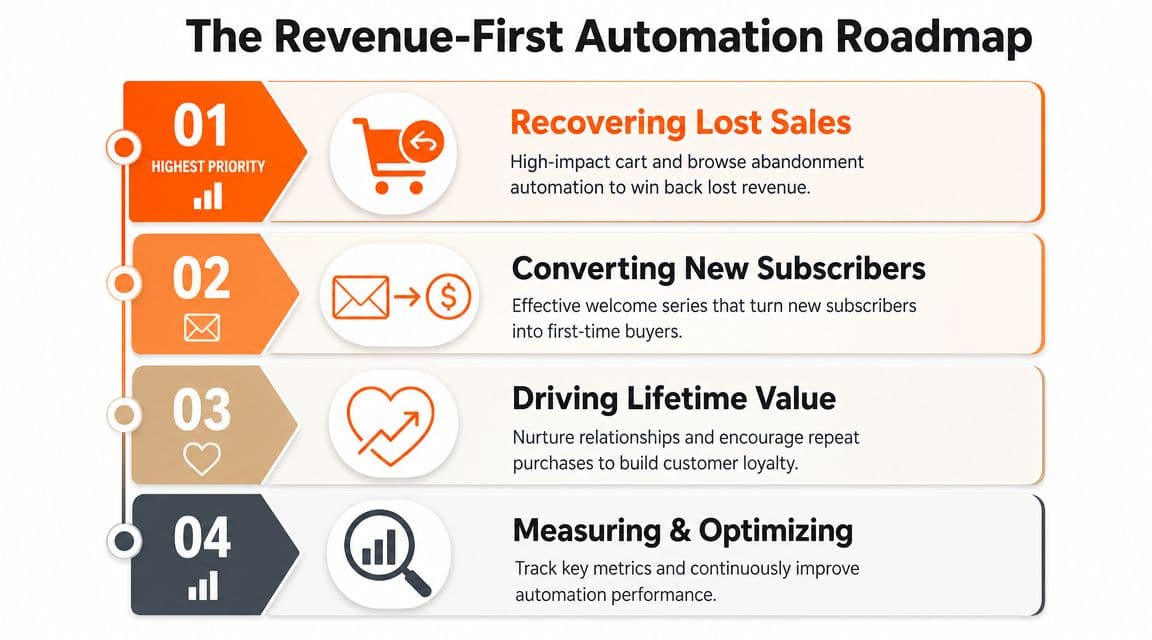
#Start with revenue leakage
If someone added to cart and left, you had buying intent in hand and lost it. That comes first.
If someone subscribed and didn't buy, you have attention but not trust yet. That comes second.
If someone already purchased, your next job is increasing lifetime value without irritating them. That comes third.
Only after those are working should you expand into deeper retention programs, VIP treatment, or more advanced channel orchestration. If you want a broader view of where AI-driven workflows fit into a store's operating model, this roundup of AI agents use cases is a solid reference point.
#Build in the order that matches cash flow
Here's the roadmap I'd use for almost any founder-led Shopify brand.
| Priority | Automation category | Why it comes first |
|---|---|---|
| 1 | Cart and browse abandonment | Captures demand that already exists |
| 2 | Welcome series | Converts new leads and paid traffic more efficiently |
| 3 | Post-purchase flows | Reduces buyer drop-off and drives second purchase |
| 4 | Retention and VIP campaigns | Expands value after the core engine is working |
This isn't arbitrary.
#What each layer is responsible for
- Recovering lost sales: Cart and browse flows stop obvious revenue leakage.
- Converting new subscribers: Welcome flows turn list growth into first orders.
- Driving lifetime value: Post-purchase messaging creates repeat customer behavior.
- Measuring and optimizing: Review performance, trim overlap, and protect the customer experience.
Operator rule: Don't build a loyalty flow before you can reliably recover carts and convert subscribers.
A lot of small business marketing automation setups stall because founders treat every automation like it has equal value. It doesn't. A re-engagement flow for a dead segment is not as urgent as a broken cart sequence. A fancy educational series is not as urgent as buyers dropping out after product page visits.
That's why this order works. It aligns effort with immediacy. Recover revenue first. Convert warm leads next. Then increase repeat purchase behavior. Everything else is optional until those basics produce dependable revenue.
#Recovering Lost Sales With Abandonment Flows
If you only build one thing this month, build abandonment properly.
These flows work because the customer already told you what they want. They viewed a product. They added to cart. They got close. You're not creating demand from scratch. You're following up on existing intent.
That's also why these flows often punch above their weight. After implementing marketing automation, 80% of users report improved lead generation, 77% report increased conversions, and sales productivity rises by 14.5%, based on these marketing automation statistics. For a Shopify founder, abandonment is the cleanest place to put that to work.
#The cart flow that most stores actually need
Keep it to three emails. More than that usually turns into nagging.
Email one, reminder
Send a simple cart reminder after the shopper leaves. Show the exact product, image, price, and cart link. Don't overexplain. The copy can be as plain as: You left something behind. Your cart is still waiting.
Email two, friction removal Here, you answer objections. Use shipping clarity, returns reassurance, product benefits, and short proof points. If you have reviews or UGC, add them here.
Email three, final nudge
This is the last touch. Keep the tone calm. You can use urgency if it's real, like low stock or a discount expiration, but don't manufacture pressure.
A good sequence sounds like a helpful salesperson, not a desperate brand.
#Browse abandonment needs a lighter touch
A browse abandoner is not a cart abandoner. Treating them the same is lazy.
Use two emails instead.
- First message: Remind them of the product or collection they viewed.
- Second message: Offer adjacent context. Best-sellers, FAQs, ingredients, use cases, sizing help, or a small bundle recommendation.
The goal isn't to force the sale. It's to move them one step deeper.
Here's a walkthrough worth watching before you build or revise your flow:
#Your setup checklist
Most abandonment problems are operational, not creative.
- Use the right trigger: Cart flow should start on cart or checkout abandonment, not just site exit.
- Suppress recent buyers: If they purchased after abandonment, remove them immediately.
- Exclude low-intent noise: Don't fire browse abandonment for a one-second product page view.
- Show the exact item: Dynamic product blocks beat generic brand messaging.
- Respect channel fatigue: If you also send SMS, set clear rules so people don't get hit on every channel at once.
If your abandoned cart email lands after the customer already bought, you didn't build an automation. You built a trust leak.
For most stores, this is enough to start:
| Flow | Email count | Core job |
|---|---|---|
| Cart abandonment | 3 | Recover high-intent revenue |
| Browse abandonment | 2 | Re-engage product interest without overpushing |
If you're using Klaviyo, Shopify Email, Omnisend, or another ESP, don't get distracted by advanced branching on day one. Start with clean triggers, buyer suppression, dynamic product content, and a direct path back to checkout. Fancy logic can wait. Recovered orders can't.
#Turning New Subscribers Into First-Time Buyers
A one-email welcome discount is lazy marketing. It trains people to wait for a code and does almost nothing to build trust.
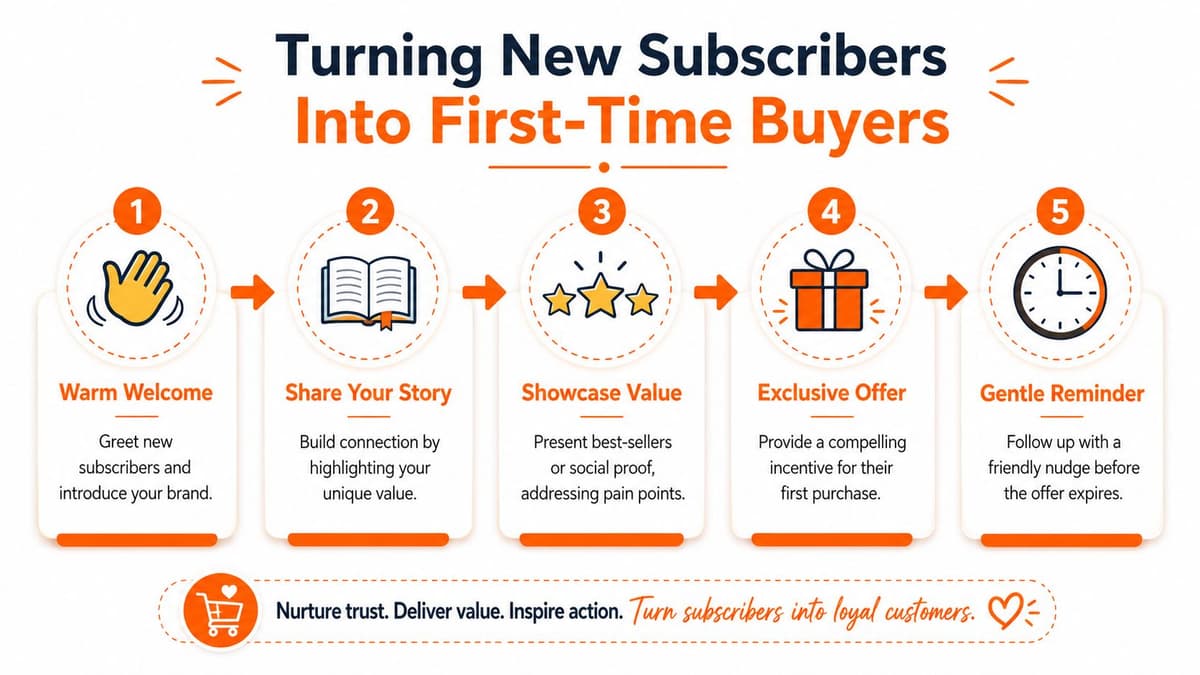
A proper welcome flow should answer four questions quickly. Who are you? Why should I care? What should I buy first? Why should I buy now?
#What each welcome email should do
I like a three- or four-email sequence for most Shopify brands.
Email one should deliver the signup incentive if you offer one, confirm what kind of communication they'll get, and point them toward a clear first action. Best-sellers work better here than broad category dumps.
Email two should make the brand feel real. Founder story, product philosophy, ingredient standards, sourcing, or the problem that pushed you to start the company. Keep it tight. This is not a memoir.
Email three should remove buying friction. Use hero products, review snippets, product education, FAQs, or a short comparison between your top SKUs. If you need help shaping segments around behavior and not just broad demographics, this post on customer segmentation examples is useful.
Email four is optional, but valuable when the first purchase takes more thought. Use it for a polite deadline on the offer or a final reminder to try the brand.
Practical rule: Every welcome email should have one job. If the message tries to tell your story, explain every product, share reviews, and push urgency at once, it will underperform.
#Simple flow logic that keeps the experience clean
The logic matters as much as the copy.
Use these rules:
- Remove buyers immediately: Once someone purchases, pull them out of the welcome flow.
- Branch by product interest: If someone clicked skincare, don't keep showing them bundles from another category.
- Cap overlap with campaigns: Don't blast subscribers with a promo campaign on the same day they're getting a welcome email.
- Match source where possible: Pop-up subscribers, quiz leads, and post-purchase opt-ins often need different creative angles.
A strong welcome sequence doesn't need a gimmick. It needs progression. Start with orientation, build trust, reduce friction, then ask for the order.
If your list is growing and first-purchase conversion still feels weak, the issue usually isn't volume. It's that your welcome flow is acting like a coupon dispenser instead of a sales process.
#Driving Lifetime Value With Post-Purchase Automations
Most stores work too hard for the first order and not hard enough for the second.
That's backwards. The first purchase proves acquisition. The second purchase is where the business starts getting healthier. This is why post-purchase automation deserves a permanent place in your small business marketing automation stack.
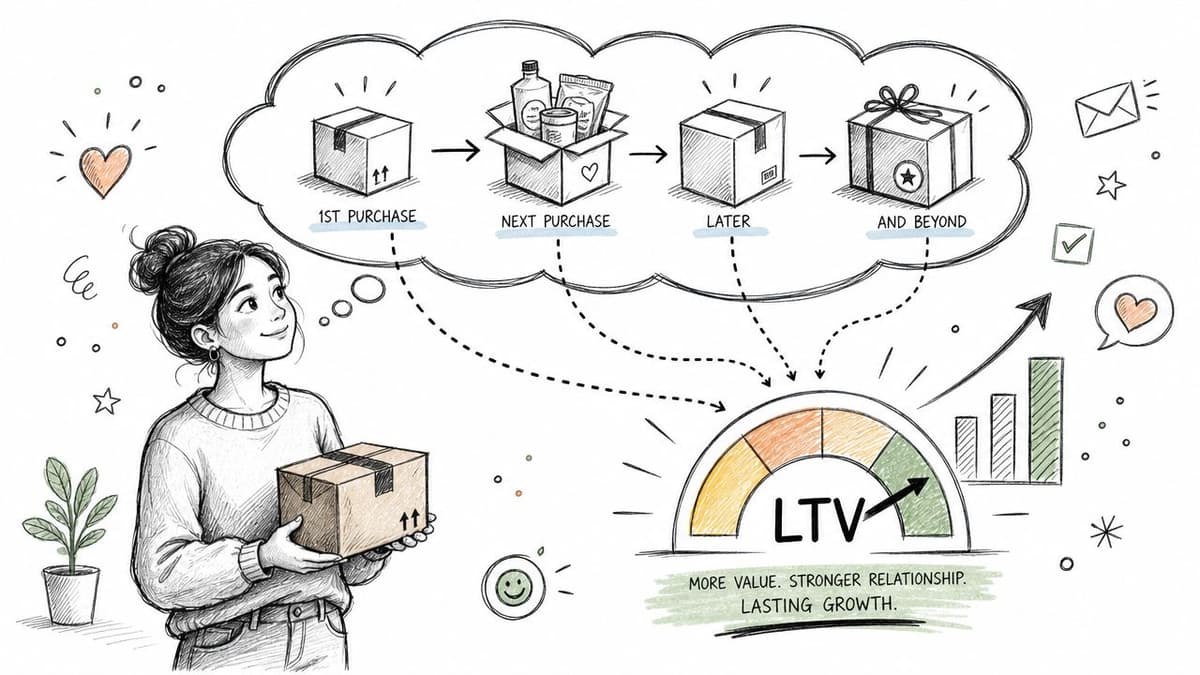
The best workflows here are not random check-ins. For small businesses, welcome sequences and re-engagement campaigns perform best when tied to explicit success metrics like time-to-purchase, opt-out rates, and revenue attribution, as outlined in this guide to marketing automation strategy.
#The first post-purchase flow to build
Start with a new-customer thank-you flow.
Email one should confirm the purchase in a human tone and reduce buyer's remorse. Thank them, reinforce why they made a good choice, and tell them what happens next.
Email two should educate. Show how to get the best result from the product. For apparel, that might be fit, styling, or care. For consumables, usage. For beauty, routine order and application. For gear, setup.
Email three can ask for a review or offer a relevant next step. The mistake here is asking for too much too fast. Don't ask for a referral, a UGC post, and a second purchase in the same breath.
#Win-back and replenishment are not the same job
Founders often lump these together. Don't.
Replenishment is for products with a natural reorder cycle. Trigger it based on the expected use window of the product. The copy should feel service-oriented: You might be running low. Add an easy reorder link and, if useful, a bundle or subscription option.
Win-back is for customers who have gone quiet. The trigger should reflect your actual buying cycle, not some generic template timer. The message should answer a blunt question. Why come back now?
Try angles like these:
- New reason to purchase: New variant, bundle, or seasonal use case
- Reduced friction: Quiz, starter set, or curated recommendations
- Reassurance: Reviews, satisfaction policy, or product education
- Selective offer: Use only when the margin supports it
Replenishment follows expected behavior. Win-back tries to restart behavior. Write them differently.
#Metrics that matter after the sale
The post-purchase layer should be judged on business outcomes, not feel-good engagement.
Use a simple scorecard:
| Flow type | Primary metric | Secondary check |
|---|---|---|
| Thank-you and education | Second purchase behavior | Support issues created after send |
| Replenishment | Repeat order rate | Time between orders |
| Win-back | Reactivated customer revenue | Opt-outs and complaints |
This is one place where analytics discipline matters more than templates. If you want a lightweight way to review what changed across your Shopify data without manually bouncing between dashboards, Arlo provides an AI-powered weekly analysis for merchants that interprets sales, traffic, customer, and product signals and ranks actions by urgency and likely revenue impact. That kind of summary can help you catch whether post-purchase flows are helping or underperforming.
Post-purchase automation should make customers feel guided, not chased. If your emails arrive too often, promote irrelevant products, or ignore purchase context, you'll hurt retention while telling yourself you're nurturing it.
#How to Know If Your Automations Are Actually Working
If you can't explain what each automation contributes to revenue, you're guessing.
That's the part most setup guides ignore. Quality control is a real problem in small business marketing automation. Many guides show how to launch flows, but few explain how to detect when automation is hurting conversion, over-messaging customers, or creating channel noise across email, SMS, and ads. That risk is highlighted in this guide to marketing automation for small business.
#Measure business outcomes, not inbox vanity
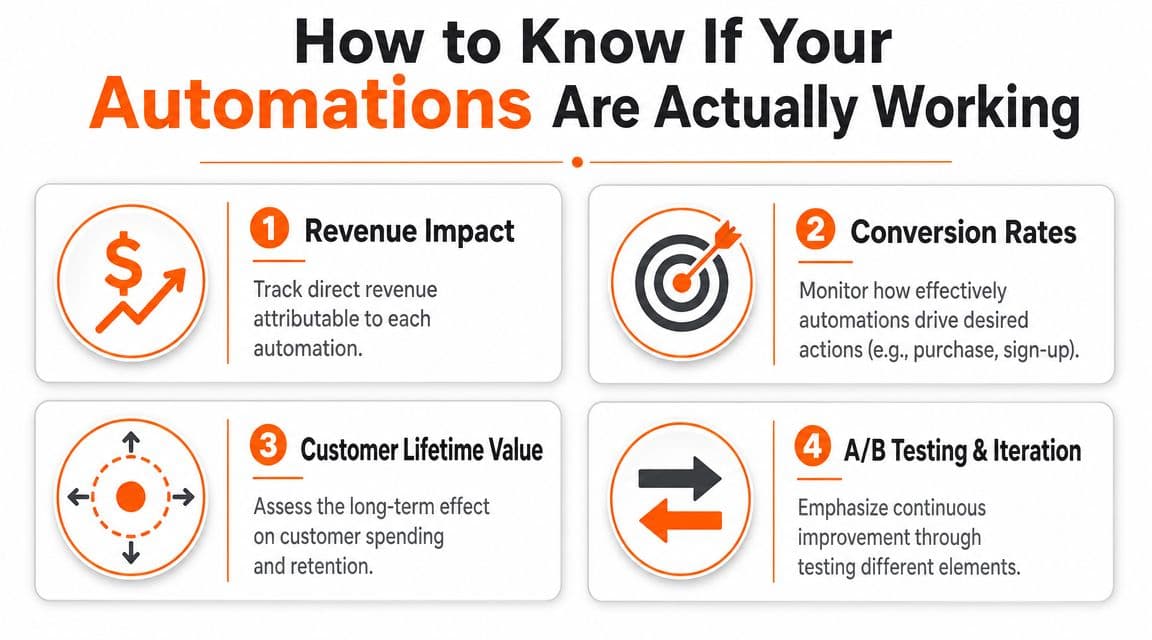
Open rate can tell you whether a subject line earned attention. It cannot tell you whether the automation deserves to exist.
Focus on these:
- Abandonment flows: Attributed revenue, recovery behavior, and whether buyers are being suppressed correctly
- Welcome flow: Conversion to first purchase and time to first order
- Post-purchase flows: Repeat purchase behavior and reactivated customer revenue
- Across all flows: Opt-outs, complaints, and overlap with campaigns
If you want a stronger measurement framework for Shopify performance overall, this article on analytics in ecommerce is a useful companion.
#The review process that catches broken automations fast
Run a weekly scan and a monthly deeper review.
Every week
- Check trigger health: Are the right people entering the flow?
- Check suppression logic: Are recent buyers being removed fast enough?
- Check message timing: Are customers getting stacked messages from campaigns and flows?
- Check obvious revenue drift: Did a previously useful flow suddenly weaken?
Every month
- Read actual emails in sequence: Broken personalization and wrong product blocks are common.
- Audit segment eligibility: Rules drift as product mix and promos change.
- Review customer friction signals: Replies, complaints, support tickets, and unsubscribes matter.
- Decide what to pause: Not every live automation deserves to stay live.
A bad automation scales mistakes faster than a human ever could.
The standard that matters is simple. Each flow should have a clear job, clean entry rules, a removal condition, and a measurable business result. If it doesn't, shut it off, fix it, or rebuild it.
If you want help turning Shopify data into a clear weekly action plan instead of another dashboard, Arlo gives founder-led brands a concise report on what changed, why it matters, and what to do next, with recommendations prioritized by urgency and revenue impact.