
Amazon Product Description Optimization Guide
By Arthur Falcone · Founder of Arlo
You've polished the title, uploaded attractive images, and filled in the bullets. Yet shoppers still leave the page, ask questions your listing should already answer, or choose a competing offer. That usually isn't a traffic problem. It's a product-description problem. The page brought the shopper close, but the content didn't remove enough uncertainty to earn the purchase.
An effective Amazon product description does more than repeat features or hide keywords in a paragraph. It acts as an answer layer across search, mobile browsing, comparison, and increasingly AI-assisted shopping. The strongest listings tell shoppers who the product suits, what it includes, whether it will work in their situation, how to use it, and what trade-offs they're accepting before they click the purchase button.
#Table of Contents
- The Anatomy of a High-Converting Amazon Listing
- Mapping Keywords to Buyer Intent
- Writing Copy That Answers Real Purchase Questions
- Structuring A+ Content and Visual Hierarchy
- Testing Variables and Measuring Revenue Impact
- The Founder Action Plan for Listing Optimization
#The Anatomy of a High-Converting Amazon Listing
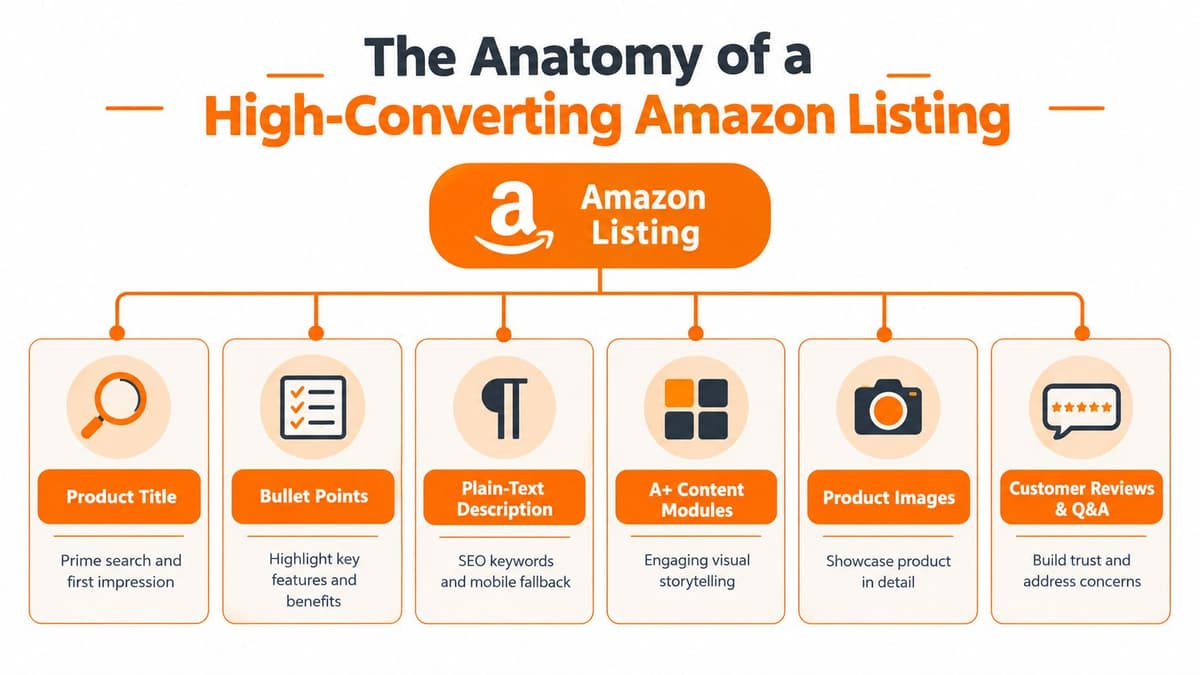
Most operators treat the description field as the listing. Amazon shoppers experience something broader: a shared detail page made up of product information, visual content, customer feedback, and competing offers. Amazon explains that multiple sellers can compete on one product detail page, while only one offer wins the Buy Box at a time. The Buy Box enables one-click purchasing, and eligible offers are evaluated against performance-based requirements. Amazon's Buy Box guidance makes the commercial implication clear: content and offer presentation matter because the winning offer controls the primary purchase path.
The hierarchy works roughly like this:
- Title: Establishes product identity and captures the shopper's first search interaction.
- Bullet points: Translate important specifications into quick benefits and qualification cues.
- Images: Prove what the product looks like, how large it is, and how it's used.
- Plain-text description: Supplies context, narrative, keywords, and fallback information.
- A+ Content: Adds visual storytelling, comparison tools, and brand context where available.
- Reviews and Q&A: Surface lived experience and unresolved objections.
#The page is shared, but the decision is personal
Amazon's product-detail structure creates a tension DTC operators often underestimate. You may own the brand voice, but shoppers compare your offer against other sellers, substitutes, and their own expectations on the same page. A polished paragraph can't compensate for unclear dimensions, weak imagery, or an offer that fails to win the primary buying path.
The description therefore needs to support the whole page rather than compete with it. Amazon says descriptions should be concise, honest, and friendly, focus on features, benefits, unique properties, and best applications, and avoid competitor references. It also identifies the description as a text-only field with a character limit that varies by category. Amazon's product-description requirements should shape the copy before creative work begins.
#Structure affects commercial performance
A 2026 industry summary reports that 90% of Amazon products use bullet points, a sign that shoppers and sellers have moved toward scannable content over dense paragraphs. The same summary cites Amazon's own selling statistics, which say more than 60% of store sales come from independent sellers, most of them small and medium-sized businesses. The industry summary helps explain why product-detail content has become a foundational competitive lever.
The practical takeaway is simple: don't write one beautiful block of copy and call the listing finished. Assign each element a job, make the jobs reinforce one another, and check whether the page answers the questions that stand between a shopper and Add to Cart.
#Mapping Keywords to Buyer Intent
Keyword stuffing fails because it treats search terms as decoration instead of signals of intent. A shopper searching for “stainless steel travel mug with leakproof lid” has a different decision context from someone searching for “travel mug.” Your copy should reflect that difference without turning the listing into a keyword dump.
Start by building an intent map before writing.
#Build the map from the product outward
Create a working sheet with four columns:
| Intent group | Shopper question | Content destination | Proof needed |
|---|---|---|---|
| Category | What is this? | Title and opening copy | Product type |
| Attribute | What makes it different? | Bullets and images | Material, construction, design |
| Compatibility | Will it work for me? | Bullets, description, Q&A | Models, sizes, use conditions |
| Use case | How and where will I use it? | Bullets, images, A+ modules | Scenario-specific benefits |
| Objection | What could go wrong? | Description, FAQ, images | Limits, care, setup |
Pull language from your own search-query data, customer-service conversations, reviews, returns, and category competitors. The aim isn't to copy competitor phrasing. It's to identify the vocabulary shoppers use when they describe the problem, the product, and the risk they're trying to avoid.
Then classify each term as discovery, evaluation, or purchase confirmation. Broad category terms belong where Amazon and shoppers expect product identity. More specific phrases should appear beside the feature or answer they describe. A compatibility phrase is only useful if the page clearly confirms compatibility.
#Place terms where they make sense
Amazon's seller guidance recommends customer-friendly search terms across titles, descriptions, bullet points, and other listing fields. Amazon's listing guidance also points sellers toward tools such as Brand Analytics for understanding search behavior where those tools are available.
Use this order of priority:
- Title: State the brand, product type, defining attribute, and meaningful variation without sacrificing readability.
- Bullets: Pair a relevant phrase with a concrete benefit or qualification detail.
- Description: Add natural context, applications, setup guidance, and supporting language.
- Backend fields: Capture relevant variants and synonyms that would make the visible copy awkward.
Don't force every variation of a phrase into every field. Repetition can make copy harder to scan, and it can create contradictions when one field uses a broad claim while another limits it.
#Match length to complexity
There isn't one universal word count for an Amazon product description. Independent ecommerce guidance recommends around 150 to 300 words for standard consumer goods, and 300 to 600 or more words for technical or high-consideration items. The product-description benchmark recommends validating length through testing across desktop and mobile while tracking conversion rate, revenue per visitor, bounce rate, and organic impressions.
Treat those ranges as starting points, not rules. A simple silicone spatula needs less explanation than a specialized replacement component. Under-description sends shoppers elsewhere for answers. Over-description makes the decision feel like work. The right length is the shortest version that resolves the product's real buying questions.
#Writing Copy That Answers Real Purchase Questions
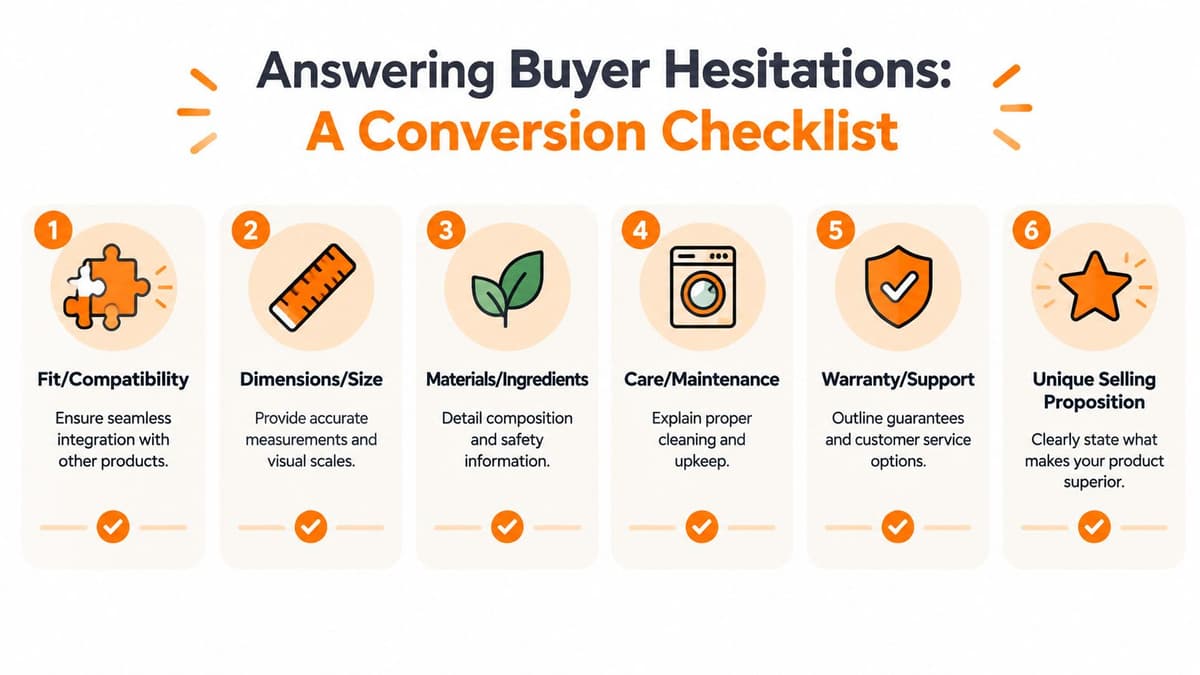
The most expensive words on an Amazon page are often the ones you leave out. A feature such as “adjustable,” “compatible,” or “easy to clean” sounds persuasive until the shopper asks, “Adjustable for what?”, “Compatible with which model?”, or “What does easy to clean involve?”
Shoppers rarely need another adjective. They need confirmation.
#Mine objections instead of guessing
Start with evidence from the places where uncertainty becomes visible:
- Support tickets: Look for repeated questions about fit, setup, operation, and missing parts.
- Return reasons: Identify mismatched expectations, sizing errors, confusing instructions, and perceived quality gaps.
- Reviews: Read positive and negative feedback for the language customers use naturally.
- Q&A: Treat unanswered questions as content briefs, not as background noise.
- Competitor reviews: Use them to spot category-wide frustrations, then explain how your product addresses or differs from them without naming competitors.
Amazon's listing guidance recommends accurate dimensions, care instructions, and warranty information, along with correct grammar, punctuation, and complete sentences. It also says sellers shouldn't include their seller name or email address in description materials. Amazon's detail-page guidance reinforces the right editorial standard: customer-useful facts belong on the page, seller promotion doesn't.
#Write the answer before the persuasion
A strong bullet usually follows this sequence:
Feature, practical outcome, qualification.
For a blender, “High-power motor” is incomplete. “High-power motor, blends frozen fruit for smoothies without requiring a separate thawing step, use the included container for single-serve preparation” gives the shopper a use case and a boundary. Only make claims your product documentation supports.
The plain-text description should work as a compact narrative. Amazon's guidance says descriptions should use complete sentences, stay concise but informative, and function like a short narrative. Use the opening to identify the product and its primary user, then explain the most relevant applications, included components, setup, care, and limitations.
#Build an answer layer for mobile and AI discovery
Mobile shoppers scan before they commit. AI shopping experiences also need concise, structured information to surface useful answers from product content, attributes, reviews, and Q&A. Recent listing guidance recommends organizing content around intent buckets such as compatibility, materials, use case, alternatives, and objections, especially as Amazon tightens title rules and other listing fields in 2026. The AI-shopping listing analysis provides useful context for this shift.
Write each answer so it can stand alone. “Yes, it fits standard 16-inch cabinets” is more useful than “Designed for convenient storage.” “Includes the lid, charging cable, and cleaning brush” is more extractable and more reassuring than “Complete kit included.”
For a deeper treatment of customer-focused product copy, use this product description writing resource. The operating principle is straightforward: every sentence should either identify the product, explain its value, prove its suitability, or remove a specific objection.
Practical rule: If a shopper could still ask the question after reading the page, the copy hasn't finished its job.
#Structuring A+ Content and Visual Hierarchy
Standard text and A+ Content solve different problems. The plain-text Amazon product description carries essential context, searchable language, and a reliable fallback when richer modules aren't visible or sufficient. A+ Content handles visual persuasion, brand context, comparison, and demonstrations that would be clumsy in a paragraph.

#Give each module a distinct job
A+ should expand the decision, not duplicate the bullets in a larger font. A useful page might use:
- Hero visual: Show the product in its primary use case and establish the central benefit.
- Feature panels: Demonstrate specific mechanisms, materials, or design choices.
- Comparison chart: Help shoppers distinguish variants and keep relevant comparisons within the brand family.
- Lifestyle imagery: Show scale, context, and the type of customer who uses the product.
- Care or setup module: Turn a potentially intimidating product into an understandable one.
- Brand section: Explain the design philosophy or category expertise without making unsupported claims.
A comparison chart is particularly useful when shoppers are choosing among sizes, bundles, or models. Make differences explicit. If one version includes an accessory and another doesn't, write that plainly. Ambiguous comparison tables create the same doubt they're meant to resolve.
#Let text carry facts and visuals carry proof
Use the standard description for details shoppers may need to search, quote, or compare. Dimensions, materials, care instructions, included components, warranty information, and compatibility should remain available in clear text. Use images to show scale, handling, installation, texture, and real-world application.
Amazon prohibits HTML, JavaScript, and other code in product-detail-page content, and it prohibits offensive content in titles, descriptions, bullets, or images. Amazon's product-page policies mean creative review should cover both wording and visual assets before publication. Plain text and policy-safe creative reduce avoidable listing problems.
The same visual hierarchy principle applies outside Amazon. Operators planning physical retail or packaging touchpoints may find this guide for UK retail owners useful for thinking about how people move from attention to evaluation and action.
A short video can demonstrate use more effectively than several paragraphs when the product's value depends on motion, setup, or transformation. Place it after the shopper has enough context to understand what to watch for.
#Avoid visual excess
More modules don't automatically create more persuasion. Repeated claims, decorative lifestyle shots, and oversized headlines consume attention without answering a new question. Before approving an A+ layout, label the decision each module supports. If two modules support the same decision, keep the clearer one and use the space for proof, limitations, or comparison.
#Testing Variables and Measuring Revenue Impact
Listing optimization becomes guesswork when operators change the title, bullets, images, and description at the same time. You may see movement, but you won't know which change caused it, whether the effect will persist, or whether a higher conversion rate came with more returns.
The discipline is controlled iteration. Change one meaningful variable, define the primary metric before launch, and record the surrounding conditions that could affect the result.
#Test the highest-leverage elements first
Prioritize elements closest to the shopper's decision:
- Main image: Does it communicate the product and scale immediately?
- Title structure: Does it identify the item and its most important qualifier clearly?
- Bullet framing: Do the bullets answer objections or merely list attributes?
- Description length and order: Does the narrative resolve uncertainty in the right sequence?
- A+ module arrangement: Does the visual story support comparison and confidence?
Amazon offers experimentation capabilities for eligible content, and third-party tools can provide additional validation workflows. The point isn't to chase a winning variation for its own sake. It's to connect a content change to commercial outcomes.
One Salsify study summarized by Envive reported that listings meeting best-practice thresholds for title length, description length, bullet count, image count, and enhanced content achieved 21x higher conversion than poor-content listings. The same source reported that moving from five to ten images increased conversion by 48%, while increasing bullets from five to six reduced conversion by 43.5%. The summarized optimization study shows why operators shouldn't assume that “more content” is automatically better.
#Measure beyond impressions
Track the metrics that connect content to money:
- Conversion rate: Indicates whether the page persuades qualified traffic.
- Add-to-cart rate: Shows whether shoppers advance before purchase.
- Revenue per visitor: Connects traffic quality and page performance.
- Return rate: Reveals whether the copy creates accurate expectations.
- Organic impressions: Helps identify whether search visibility changes after content updates.
Use a testing record with the hypothesis, exact copy change, launch date, audience or traffic context, primary metric, secondary metrics, and decision rule. For statistical concepts that help prevent premature conclusions, review this explanation of statistical significance.
Virtual validation can also help teams evaluate product concepts and creative directions before committing fully. Genpire virtual validation is one resource to consider when you're assessing ideas before production or broader testing.
A winning test that increases clicks but worsens returns isn't a win. Amazon content should produce a more confident purchase, not merely a more impulsive one.
#The Founder Action Plan for Listing Optimization
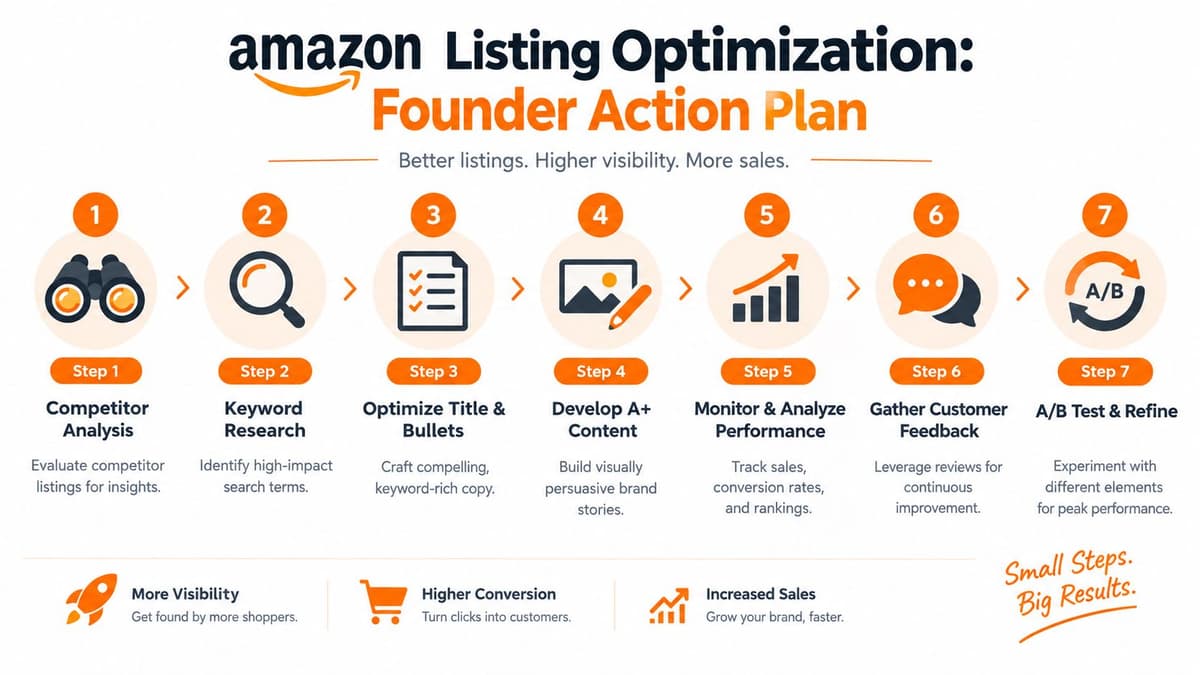
Founders don't need a catalog-wide rewrite to start. Pick your top five ASINs, rank them by revenue importance and visible content gaps, then work through the page in an order that protects existing momentum.
#Use a focused 30-day sequence
Days 1 to 5, audit. Record the current title, bullets, description, images, A+ modules, reviews, Q&A, conversion rate, add-to-cart rate, and return reasons. Mark every unanswered question involving fit, dimensions, contents, setup, care, warranty, or use case.
Days 6 to 10, map intent. Pull search language from your available Amazon data, support tickets, reviews, and returns. Assign each important phrase to the title, bullets, description, or backend fields. Remove claims that aren't supported by product facts.
Days 11 to 15, rewrite the text. Make the title identifiable, turn bullets into benefit-led answers, and write a concise narrative description. Include accurate dimensions, care instructions, warranty information, included components, and compatibility details where relevant.
Days 16 to 20, repair the visual path. Check the main image, product scale, use-case imagery, and A+ sequence. Remove repetition and make sure each visual answers a different purchase question.
Days 21 to 25, publish carefully. Review Amazon's restrictions on code, offensive content, competitor references, seller contact details, and unsupported claims. Keep a clean version history so you can identify which edit produced a change.
Days 26 to 30, test and review. Run a controlled experiment on one variable, then review conversion, revenue per visitor, add-to-cart behavior, and returns. Feed new customer questions back into the next copy iteration.
The right operating rhythm is continuous, not dramatic. For founders balancing Amazon with a DTC channel, this Shopify versus Amazon comparison can help clarify which content and measurement responsibilities belong to each channel.
Start this week by auditing one high-value ASIN, collecting its unanswered questions, and rewriting only the content tied to those objections. Then document the baseline and test the next change instead of relying on instinct.
Arlo turns Shopify sales, traffic, customer, and product data into a weekly report that explains what changed, why it matters, and what to do next, which can help you connect Amazon listing work with wider DTC revenue signals. Visit Arlo to see how the AI marketing analyst can prioritize practical growth actions for your store.