
Business Intelligence Reporting for Shopify Stores in 2026
By Arthur Falcone · Founder of Arlo
You're probably doing this right now. One tab has Shopify open. Another has Meta Ads Manager. A third has Google Analytics. Klaviyo is sitting somewhere in the background. Every dashboard shows movement, but none of them tell you what to do before lunch.
That's the main problem with business intelligence reporting for most Shopify brands. You don't need more charts. You need a short, reliable way to turn messy store data into a weekly list of revenue decisions. Founders lose time when reporting stays stuck at “what happened” instead of pushing all the way to “what should I do next.”
If you run a DTC store, your reporting should help you catch broken conversion paths, wasted ad spend, weak repeat purchase behavior, and margin leaks fast. If it doesn't do that, it's decoration.
This post covers the reporting layer for brands scaling past founder-run dashboards: recurring reports, definitions your team shares, and the discipline around them. New to the measurement stack? Start with the complete Shopify marketing analytics guide. Building your first operating panel instead? See how to build a data analytic dashboard.
#Table of Contents
- What Is Business Intelligence Reporting Really
- Why Your Current Reports Are Holding You Back
- The Four Pillars of Actionable DTC Reporting
- Key Metrics That Actually Drive Growth
- BI Reporting in Action Real-World DTC Use Cases
- From Data to Decisions The AI-Powered Weekly Report
- Your Implementation Checklist for Smarter Reporting
#What Is Business Intelligence Reporting Really
Business intelligence reporting isn't a dashboard. It's a decision system.
Shopify gives you data. Meta gives you ad data. Klaviyo gives you email data. Google Analytics gives you behavior data. None of those tools, by themselves, give you intelligence. Intelligence is the explanation behind the numbers and the next action attached to that explanation.
Think of business intelligence reporting as a translator. Your store speaks in clicks, sessions, returning customers, refund trends, and conversion drops. A good reporting process translates that into plain English: mobile checkout is underperforming, repeat purchase is slipping, paid social is bringing traffic that doesn't convert, or one product is carrying too much of total revenue.
#Data is not the same as judgment
Founders often confuse access with clarity. If you can log into five tools, it feels like you should know what's going on. But disconnected numbers create false confidence.
A useful report answers questions like:
- Revenue quality: Did sales grow because demand improved, or because discounts got more aggressive?
- Channel quality: Which traffic source is attracting buyers, not just visitors?
- Customer quality: Are new customers coming back, or are you paying for one-time orders?
- Site quality: Is the store converting well across devices, landing pages, and product groups?
Practical rule: If a report doesn't end with a decision, it isn't finished.
The reason this matters is simple. The BI market itself reached USD 34.82 billion in 2025 and is projected to reach USD 72.21 billion by 2034, with 8.40% CAGR, according to Fortune Business Insights on the business intelligence market. Brands are spending because data-driven decision-making is no longer optional.
#What founders should expect from reporting
Good business intelligence reporting should give you three things every week:
- A clean version of the truth
- A short explanation of what changed
- A ranked list of actions
That's also why resources like NanoPIM's revenue intelligence strategies are useful. They push beyond reporting as a visual exercise and toward reporting as a revenue operating discipline. If you want a practical view of how ecommerce teams connect product, channel, and revenue signals, it's worth your time.
If your current setup still feels fragmented, this guide to an ecommerce analytics platform is a useful companion because it frames analytics around decisions rather than raw exports.
#Why Your Current Reports Are Holding You Back
Most DTC reports fail for one reason. They were built to display data, not drive action.

You can have more dashboards than ever and still run the business by instinct. That's not rare. BI adoption among global employees remains around 25%, with barriers including lack of proper training at 50%, insufficient data quality at 41%, and budget constraints at 36%, as shown in BARC's BI adoption analysis. The software exists. The behavior change doesn't automatically follow.
#Your data lives in silos
Shopify knows orders. Meta knows ad delivery. Klaviyo knows email engagement. Your inventory app knows stock. Those tools don't naturally tell one story.
So a founder looks at a healthy ROAS in Ads Manager and assumes marketing is fine. Then profit feels tight because the hero SKU is discounted, fulfillment costs rose, and the customers being acquired don't repurchase. The ad dashboard wasn't wrong. It was incomplete.
If you sell across multiple channels or product variants, this gets even worse. Inventory issues can distort performance reports fast. If stock accuracy is weak, you can waste money driving traffic to products you can't fulfill. That's why operational discipline matters just as much as marketing clarity. A practical example is learning how to avoid overselling on Shopify when inventory moves across systems.
#Most reports obsess over lagging indicators
Default dashboards tell you what already happened. Revenue yesterday. Spend last week. Conversion rate last month.
That matters, but lagging metrics alone won't save a rough quarter. Founders need reports that expose developing problems early:
- Traffic quality changes
- Device-level conversion drops
- Repeat purchase softness
- Inventory pressure on bestsellers
- Creative fatigue in paid acquisition
A report that arrives after the damage is only useful for explaining the damage.
#Your reports stop one step too early
This is the part that kills execution. A dashboard points at a problem but doesn't assign a next move.
You see:
- traffic up
- revenue flat
- email down
- paid spend steady
So what now?
A useful report should say something closer to this:
- Investigate mobile PDP friction because traffic is growing but product view to cart progression is weak
- Reduce spend on one paid channel because acquisition is rising without matching conversion quality
- Fix the welcome flow because first-order demand isn't being captured well enough
- Protect inventory on a winning SKU because it's carrying too much revenue concentration
That's the difference between looking informed and operating well.
#The Four Pillars of Actionable DTC Reporting
A store report should work like a car dashboard. You don't drive by staring only at the speedometer. You need fuel, engine temperature, warning lights, and direction. DTC reporting works the same way.
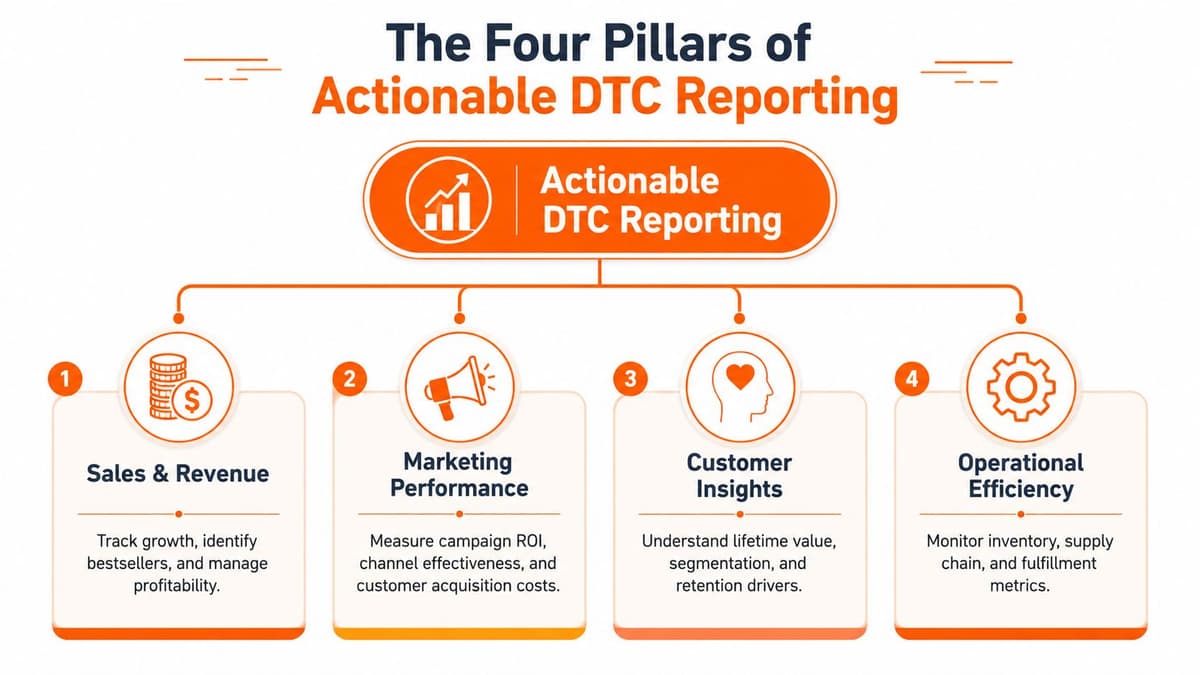
If one pillar is missing, you make expensive mistakes with partial information.
#Sales and revenue
This pillar tells you whether growth is healthy or fragile.
You're not just checking top-line sales. You're looking at what products are driving revenue, which offers are moving demand, where margin pressure is creeping in, and whether one SKU or one campaign is carrying too much of the business.
Questions this pillar should answer:
- Which products are growing and which are fading?
- Are discounts driving too much of current revenue?
- Is average order behavior improving or weakening?
- Are returns or refunds changing the overall picture?
#Marketing and acquisition
This pillar tells you whether your customer acquisition engine is efficient.
A lot of brands spend too much time inside ad platform reporting and not enough time connecting paid activity to business outcomes. Good business intelligence reporting pulls campaign data into the same decision layer as sales and customer behavior.
Business Intelligence systems let teams track campaign data centrally and calculate metrics like CAC, CPL, and CTR, which helps optimize marketing ROI, according to NetSuite's business intelligence examples.
#Customer behavior and LTV
In this context, weak brands get exposed.
A store can look healthy on first-purchase revenue and still have a bad business underneath if buyers don't come back. This pillar should show which cohorts reorder, which channels bring better long-term customers, and where retention is slipping.
It should also help you segment buyers in a way that's useful. BI tools can support granular customer segmentation by shopping habits and demographics, helping operators run more targeted campaigns, as explained in Intexsoft's ecommerce BI overview.
#Website and conversion
Traffic is only valuable if the site converts it.
This pillar should reveal friction by device, page type, source, and product path. It's where you catch a mobile issue before it turns into a monthly revenue problem.
Operator mindset: If the site converts poorly, every marketing channel gets more expensive at the same time.
A reporting system only works when these pillars pull from a clean pipeline. Effective BI reporting requires a structured data pipeline into a central repository, and organizations with automated refresh cycles reduce report latency by 40-60% compared with manual processes, according to Databricks' guide to BI reporting. For a founder, that means fresher numbers and less time arguing over whose spreadsheet is right.
#Key Metrics That Actually Drive Growth
The fastest way to ruin reporting is to track everything equally. Not all metrics deserve a seat at the table.
Data-driven organizations are 23 times more likely to acquire customers, 6 times more likely to retain them, and 19 times more likely to achieve profitability compared to non-data-driven peers, based on Kanerika's business intelligence statistics roundup. The lesson isn't “measure more.” It's “measure what changes decisions.”
#The short list that matters
Across the four pillars, these are the metrics I'd keep in the founder view.
- Sales and revenue: Revenue by product, average order value, refund trend
- Marketing and acquisition: CAC by channel, conversion rate by traffic source, MER trend
- Customer behavior: New vs returning customer mix, repeat purchase behavior, cohort quality
- Website and conversion: Conversion rate by device, add to cart behavior, checkout completion trend
Vanity metrics still have context value. Sessions matter. Reach matters. Impressions matter. But they should never lead the conversation. A founder can't deposit impressions.
#DTC Problem Diagnosis Chart
| Common Symptom | Primary Metric to Investigate | Secondary Metric to Check |
|---|---|---|
| Revenue is down but traffic is up | Conversion rate by traffic source | Add to cart behavior by device |
| Paid spend is rising without profit improvement | CAC by channel | MER trend |
| Email campaigns are sending but store impact feels weak | Revenue tied to email flows and campaigns | Returning customer behavior |
| Bestselling product looks strong but cash feels tight | Revenue by product | Refund trend |
| New customer growth looks healthy but repeat sales lag | Cohort quality | New vs returning customer mix |
| Mobile traffic dominates but revenue lags | Conversion rate by device | Checkout completion trend |
The point of a chart like this is speed. You don't need a three-hour analytics review to get oriented. You need a reliable first pass that points you toward the likely cause.
#What to do with the metrics each week
Use them in sequence, not as a pile.
-
Start with the business symptom
What hurts right now: revenue softness, cash pressure, poor repeat purchase, or weak acquisition efficiency? -
Check the primary metric first
Don't bounce between ten dashboards. Start with the number most tied to the symptom. -
Use the secondary metric for context
This tells you whether the first issue is a channel problem, site problem, offer problem, or customer problem.
If you want a broader framework for this kind of metric hierarchy, this piece on analytics in ecommerce is worth reading. It helps separate useful performance signals from dashboard clutter.
#BI Reporting in Action Real-World DTC Use Cases
Theory is nice. Operators need examples.
Here's what business intelligence reporting looks like when a Shopify founder uses it properly.
#Use case one mobile revenue suddenly drops
The founder sees sales dip over a few days. Traffic isn't collapsing, and paid spend hasn't changed much. A weak operator panics and starts cutting ads.
A better operator checks conversion by device and sees mobile underperforming sharply against desktop. Then they review the purchase path and find a broken checkout interaction on mobile.
Problem: Revenue fell.
Data: Device-level conversion and checkout completion exposed the issue.
Insight: The traffic wasn't the problem. The mobile buying path was.
Action: Fix checkout, test on live devices, then monitor recovery before touching ad budgets.
#Use case two one channel brings better customers
A founder is buying customers from multiple acquisition channels. First-purchase results look similar on the surface, so budget is spread too evenly.
The BI report combines order data and customer behavior, then shows a clear pattern. One channel is bringing customers who reorder more often and stick around longer. The others are feeding short-term revenue with weaker retention.
Problem: Acquisition budget feels noisy.
Data: Cohort and customer behavior analysis show stronger long-term quality from one source.
Insight: Not all new customers are equal.
Action: Shift more spend toward the channel producing stronger downstream value, then adapt creative around that audience.
#Use case three where should the next ad dollars go
A founder has room to invest more in growth but doesn't know where to place the next chunk of budget. Looking only at in-platform performance creates bias because every ad tool makes itself look better than it is.
A centralized BI view helps compare channel-level acquisition efficiency against store-level outcomes. Marketing teams can use BI systems to track campaign metrics in one place and calculate CAC, CPL, and CTR, which gives a much cleaner base for ROI decisions, as noted in the earlier NetSuite reference.
“Don't allocate budget based on the prettiest dashboard. Allocate it based on the channel that creates the strongest business result.”
Problem: Budget allocation is uncertain.
Data: Centralized campaign metrics tied to store performance.
Insight: One channel may be cheap but low quality, while another is more expensive upfront and stronger commercially.
Action: Fund the channel that improves the business, not the one that wins inside its own ad interface.
#From Data to Decisions The AI-Powered Weekly Report
Manual reporting breaks when the founder gets busy. Which is almost always.
You start with a clean spreadsheet. Then the week gets messy. Promotions change, a product goes out of stock, an ad account drifts, someone asks for a quick export, and your “weekly reporting process” turns into a pile of half-trusted screenshots.

That's why modern business intelligence reporting needs to do more than summarize. It needs to interpret. One of the biggest gaps in DTC analytics is the jump from visible metrics to prioritized action. While 78% of DTC brands use BI tools, only 12% regularly convert dashboard data into concrete, ranked revenue strategies, according to Preset's guide to business intelligence reporting.
#What the weekly report should actually include
A founder-friendly weekly report should be plain language first, charts second.
It should answer:
- What changed
- Why it likely changed
- What matters most
- What to do this week
That last line matters most. If reporting ends with observation, it creates work. If it ends with ranked actions, it saves work.
A useful weekly brief should include:
-
Top business shifts
Revenue, conversion, customer, and product changes worth attention. -
Likely causes
Not perfect certainty, but a clear read on what's driving movement. -
Prioritized actions
A short list sorted by urgency and commercial impact. -
Plain-language summaries
No analyst-speak. No chart archaeology.
There's also a format issue that teams often ignore. Founders don't always want another dashboard. They want something they can skim in minutes, or even listen to while moving between meetings.
After a founder sees the summary, richer walkthroughs can help. This kind of short-form explanation is why video works well inside a reporting workflow:
#Why this beats the spreadsheet ritual
Manual reporting usually has four weaknesses:
- It's delayed
- It depends on one person
- It buries the recommendation
- It breaks under growth
An AI-powered reporting layer fixes the hardest part for founder-led brands. It turns scattered store, product, traffic, and customer signals into a weekly operating brief. That's the upgrade. Not prettier charts. Faster, clearer decisions.
#Your Implementation Checklist for Smarter Reporting
You don't need a giant BI project to improve reporting. You need a tighter operating rhythm.
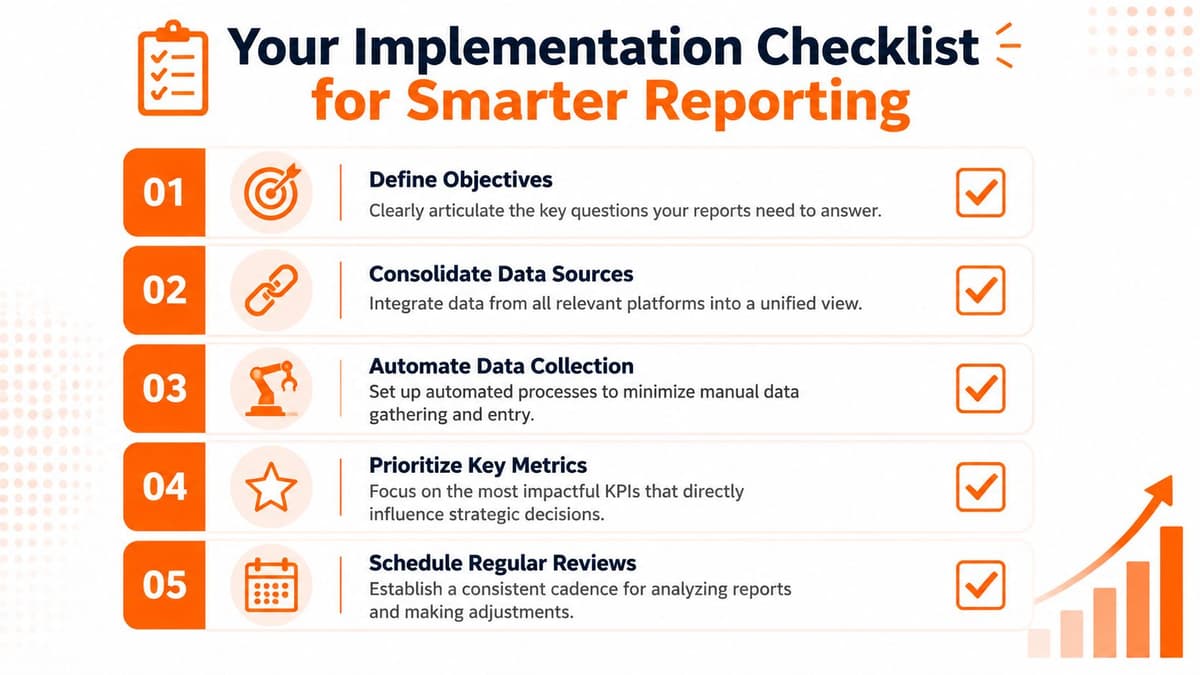
Ecommerce founders using BI tools save exactly 40% of their time when preparing data, according to DataBrain's ecommerce BI article. That time matters because speed matters. The faster you prep the truth, the faster you can act on it.
#The weekly operating checklist
-
Define your top three business questions
Don't start with software. Start with decisions. Examples: Why is repeat purchase softening? Which channel is driving profitable growth? Where is mobile conversion leaking? -
Audit your current data sources
List Shopify, Meta Ads, Google Analytics, Klaviyo, inventory tools, and any reporting sheets your team still uses. Mark where the gaps are. If a tool shows numbers but can't help answer a business question, it's not enough. -
Build around the four pillars
Make sure your reporting covers sales, marketing, customer behavior, and website conversion. If one pillar is weak, your decisions will be weak too. -
Create a fixed weekly review ritual
Put a recurring growth review on the calendar. Keep it short. Review changes, identify causes, assign actions, and close the meeting with owners and deadlines. -
Track only a small founder set first
Start with five to seven metrics. Expand later. Most stores don't have a data shortage. They have a focus shortage.
#What to stop doing
A better reporting habit also means killing bad habits.
-
Stop screenshot reporting
If your team shares disconnected screenshots in Slack, you don't have a reporting system. -
Stop treating platform dashboards as final truth
Ad platforms explain ad platforms. They don't explain your business. -
Stop reviewing metrics without assigning action
Every review should end with decisions, owners, and timing.
Bottom line: A report should reduce founder workload, not create another analysis job.
If you want a clearer picture of what a practical reporting interface can look like, this guide to a data analytic dashboard is a good reference point for building something your team will use.
If you're tired of bouncing between Shopify, Meta, GA, and Klaviyo just to guess at what matters, Arlo is built for exactly that problem. It gives Shopify brands a concise weekly “20 Minute CMO” report that turns raw store data into clear strategy, ranked action items, and plain-language guidance you can use. If your current business intelligence reporting still ends at charts, Arlo helps push it to decisions.