
Data Quality Assessment for Shopify Stores
By Arthur Falcone · Founder of Arlo
Meta says revenue is up. Shopify admin looks flat. Your Klaviyo audience is larger than your paying-customer count, and someone wants approval to increase ad spend before lunch. You don't need another dashboard. You need to know which disagreement could change the decision.
A data quality assessment checks whether your data is reliable enough for a specific action. For a Shopify founder, the useful output isn't a polished health score. It's a short list of defects, the money or customers each could affect, and the person responsible for fixing them.
#Table of Contents
- The Shopify Scorecard Worth Trusting
- How to Run the Six-Step Audit
- Common Breaks and the First Fix
- Which Defects Change a Decision This Week
- Simple Automations That Keep the Score Honest
- Act on the Three Defects That Move Revenue
#The Shopify Scorecard Worth Trusting
A store can have complete order records and still report the wrong revenue. It can also have accurate sales totals but customer profiles that aren't safe to use for a campaign. Averaging those conditions into a mystery percentage hides the work you need to do.
The peer-reviewed review of data-quality frameworks identifies accuracy, completeness, consistency, timeliness, uniqueness, and validity as the central dimensions in ISO 8000-8. Keep them separate:
- Accuracy: Does the value agree with reality or a trusted reference?
- Completeness: Are the fields required for the decision populated?
- Consistency: Do connected systems represent the same thing the same way?
- Timeliness: Did the information arrive before you needed it?
- Uniqueness: Is each entity represented without unintended duplicates?
- Validity: Does the value meet the defined format, range, and relationship rules?
#Put business decisions beside the checks
Build the scorecard around datasets your team uses, not every table your apps happen to create.
Shopify data quality scorecard
| Dataset | Check | Pass target | Decision a fail can change |
|---|---|---|---|
| Orders | Duplicate order IDs and net sales versus payment settlement | Zero duplicate order IDs; revenue inside a written tolerance, such as a hypothetical 1% | Reported revenue and whether to scale ads |
| Customers | Email validity, uniqueness, and address freshness | Valid unique emails; bad records suppressed from sends and fulfillment | Retention reads and who actually gets the campaign |
| Traffic | Channel fields present and GA4 sample share checked | Unsampled, or reconciled to raw Shopify orders before a budget change | Channel mix and new-customer CAC |
| Product feed | SKU, price, availability, and image versus the live catalog | Required fields filled; price and stock match Shopify | Shopping ads and on-site conversion |
| Refunds | Late refunds included in net revenue | Refunds tied before the reporting cutoff used for decisions | Margin and ROAS |
| Attribution | One order claimed by two channels | One documented rule across Shopify and ad platforms | Which campaign to scale or cut |
Orders need a reconciliation rule, not just a total. Define the comparison period, currency, payment status, and treatment of refunds before setting the tolerance. Payment settlements aren't automatically identical to Shopify net sales: fees, payout timing, tax, shipping, and other adjustments need an explicit reconciliation bridge.
For customers, distinguish an email address from a person. A valid-looking email doesn't prove that the address is deliverable, current, or attached to the right profile. Flag questionable records for correction, and hold affected sends or fulfillment actions rather than substituting a guessed value.
#Make every pass explainable
Traffic checks should establish whether a channel is missing, deliberately unassigned, or unavailable because of measurement limits. Don't force every unassigned visit into a paid channel just to make the report look complete. That produces a cleaner table and a worse budget decision.
Product-feed checks need variant-level comparisons. A product can be available while the advertised size is sold out. Check the actual SKU, advertised price, availability, and image against the live variant.
Refunds and attribution require written definitions. Record when refunds enter the reporting period, and choose the attribution model used for shared decisions. You don't need to make Meta and Shopify report identical attribution; you need to stop adding their claims together as though they were independent orders.
Store missing-value rate, duplicate rate, rule-conformance rate, and cross-system inconsistency rate by source and date. Add the tested population, rule, owner, and decision at risk alongside each result. Your data analytics dashboard should expose these definitions, not bury them behind a green status badge.
Practical rule: A pass means the data supports a named decision under a written rule. It doesn't mean the dataset is flawless.
Fill this card before changing spend or creative. Otherwise, you may be optimizing against a reporting defect rather than customer behavior.
#How to Run the Six-Step Audit
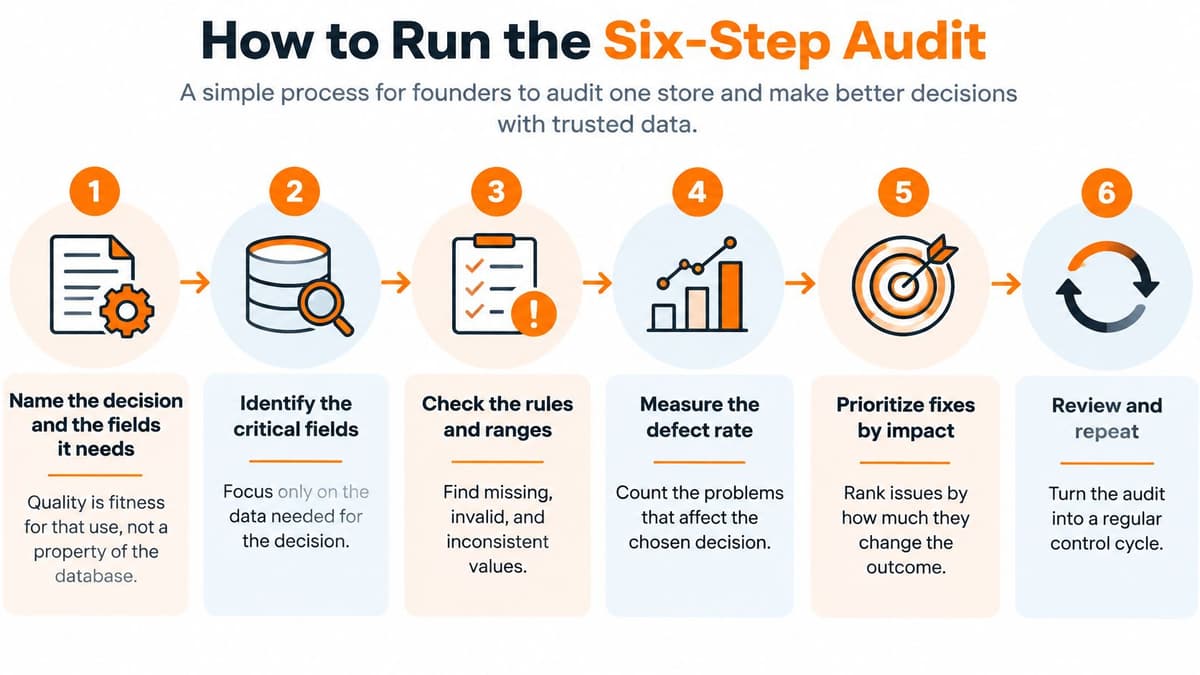
Start with a single store and a recent reporting period. A Shopify export, payment-provider report, and spreadsheet can establish a useful baseline before you invest in a warehouse or monitoring platform.
The UK Government's data quality action plan implementation guide supports a repeatable cycle of defining requirements, measuring quality, prioritizing improvements, and reviewing results. Its fitness-for-purpose approach matters: a dataset can pass a completeness test and still be unsuitable for your decision.
#Establish the decision and baseline
-
Name the decision and its required fields.
Write an action, not an ambition: whether to increase yesterday's prospecting budget, for example. That needs orders, spend, revenue, refunds, timestamps, and the channel definition. A monthly merchandising review can tolerate information arriving later than a morning budget call. The common slip is auditing every available field while leaving the actual decision undefined. -
Profile a recent week.
Compare row counts, nulls, minimum and maximum revenue, and distinct order and customer IDs across Shopify admin and your spreadsheet or warehouse. Keep identical date boundaries and filters. Investigate surprising values rather than deleting them automatically: negative amounts may represent legitimate refunds. Don't compare an order-level export with a line-item table and assume the extra rows are duplicates. -
Turn expectations into executable rules.
Require timestamps to parse, currencies to belong to your accepted list, and order references to resolve to real orders. Define permitted transaction states and legitimate exceptions. For example, a guest checkout may not have the same customer identifier as an account holder. The mistake is treating an expected exception as a defect, then filling the gap with invented data.
#Measure, prioritize, and verify
-
Calculate each dimension separately.
Measure completeness per critical field as populated expected records divided by expected records. Track duplicate-key rate for uniqueness; passing type, range, allowed-value, and relationship checks for validity; and agreement among orders, payments, refunds, and attribution for consistency. For timeliness, record median ingestion lag and the share arriving before the reporting cutoff. Accuracy requires comparison with a trusted reference, not another formatting test.Select a defensible sample across relevant transaction types, or inspect every high-value order. Compare the values with payment evidence, classify discrepancies, and check whether errors cluster by device, geography, campaign, or time period. The review of data-quality assessment methods describes external-reference approaches to assessing accuracy; for your store, publish the defect rate alongside sample coverage and preserve the evidence. Don't select only easy, successfully completed purchases and call the result representative.
-
Rank failures by business impact.
Attach each defect to the action it could alter and estimate the affected revenue, spend, or audience. Missing refunds in a budget report deserve attention before empty optional product notes. Keep uncertainty visible: record a lower and upper exposure estimate instead of presenting a rough calculation as booked loss. The common slip is prioritizing the field with the most nulls rather than the most consequential error. -
Fix, remeasure, and retain the history.
Store results by source, field, date, and severity, together with the rule version and owner. Set service levels appropriate to the use: duplicate order IDs shouldn't pass, while currency validation needs an explicit acceptance target and exception process. Rerun the same check after remediation. A clean screenshot isn't evidence that the next import won't recreate the problem.
Keep the denominator. A defect rate without the population tested tells the founder too little to act safely.
When remediation involves catalog cleanup, app housekeeping, or storefront checks, ServeApps' store maintenance tips for Shopify merchants provide a useful operational companion. Keep those maintenance tasks separate from proving that the reporting pipeline is correct.
#Common Breaks and the First Fix
When Shopify revenue exceeds payment settlements, don't start by replacing tracking. First establish whether you're comparing sales with payouts, whether the periods align, and whether the report includes the same transaction states. A legitimate timing or fee difference needs an explanation, not a tracking rebuild.
The patterns below are diagnostic starting points, not automatic verdicts. Confirm the cause at the record level before changing production data.
#Match the symptom to a test
Shopify data symptoms and first fixes
| What you see | Usual cause | First fix |
|---|---|---|
| Shopify revenue above payment settlements | Double-counted orders or refunds not yet in net, after timing and settlement adjustments are accounted for | Tie order count, gross, discounts, refunds, shipping, tax, and net to settlement |
| GA4 channel mix you cannot reproduce | Sampling past the event quota or a missing purchase event | Read the data-quality percentage and compare with raw Shopify orders |
| Email list larger than paying customers | Duplicate profiles or invalid emails still mailable, alongside legitimate non-buying subscribers | Deduplicate on customer ID and email, then suppress bad rows |
| Feed disapprovals or the wrong price in ads | Stale price or availability versus the live product | Check SKU, price, stock, and image before changing creative |
| Monday revenue drops, then recovers | Ingestion lag past the report cutoff | Track median lag and don't pause spend on an incomplete day |
| Two dashboards disagree on order count | Join fan-out or a timezone mismatch | Count distinct order IDs and use one calendar |
A revenue reconciliation should explain every component, not force two totals to match. Separate sales, discounts, refunds, shipping, and tax, then account for fees and settlement timing. If the unexplained remainder exceeds your written tolerance, hold decisions that rely on the disputed number.
A common join problem appears when an order table connects to both line items and refunds. Each relationship can add rows, so summing the original order revenue after the join inflates sales. Compare distinct order IDs before and after each join, and aggregate child tables to the intended reporting grain before combining them.
#Separate measurement limits from performance changes
For standard GA4 properties, the event-level query limit is 10 million events, according to Google Analytics' sampling documentation. Inspect the data-quality indicator on the actual report used for the budget decision, not a different dashboard that happens to show similar metrics.
If sampling is present, rerun a narrower query or use the highest available sampling limit, then compare the business conclusion against Shopify orders. Sampling and missing purchase events are different failures. A sampling adjustment won't repair an event that was never collected.
An incomplete reporting day is not evidence of a failed campaign.
Check event time against ingestion time before reacting to a sudden drop. If orders occurred but arrived after the report ran, mark that period incomplete and rerun it when the source catches up. Don't shift the sales date to the ingestion date just to make the dashboard appear current.
An email audience larger than the buyer count isn't necessarily wrong. Newsletter subscribers, giveaway entrants, and abandoned-checkout contacts can legitimately exist without purchases. Inspect overlapping identities and sending eligibility before merging records, and preserve consent and suppression status during cleanup.
For product feeds, inspect the affected variant rather than refreshing the entire catalog blindly. Confirm the landing-page price and stock, identify the stale export or transformation, and reprocess the affected item. Changing creative won't fix an ad that advertises an unavailable variant.
Keep raw exports, transformation logic, and discrepancy notes with the incident. The next operator should be able to reproduce the KPI without relying on someone's memory of which filter made it look right.
#Which Defects Change a Decision This Week
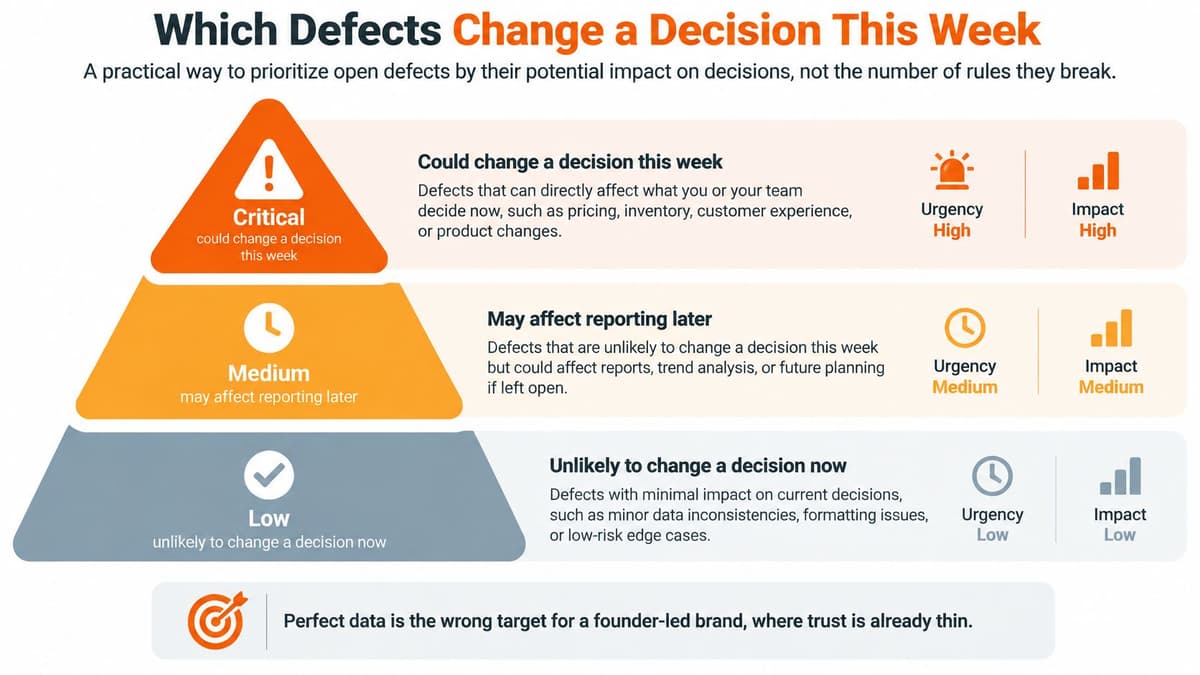
Perfect data is the wrong target for a founder-led brand, where trust is already thin. Research cited in Shopify's discussion of business intelligence failures reports that 67% of businesses have low trust in their data, 77% encounter production BI inaccuracies at least monthly, and only 20% continuously test dashboards after launch.
Rank defects by the decision they could change, not their failed-rule count.
Defect tiers by decision risk
| Tier | Example defect | Decision it can change | Check first |
|---|---|---|---|
| 1 | Missing refunds or double-counted orders | Reported revenue and ROAS | Tie net sales to settlement |
| 2 | Purchase-event gap or sampled GA4 channel read | Ad budget by channel | Compare data-quality percentage with raw Shopify orders |
| 3 | Duplicate or invalid customer emails | Retention reads, list size, sends | Dedupe on customer ID and email |
| 4 | Stale price or stock status | Shopping ads and spend on unsellable items | Check SKU, price, stock and image against live catalog |
| 5 | Null in an unused field | None this week | Leave on backlog |
Treat this order as a starting point. An unavailable bestseller receiving paid traffic may outrank a customer-profile cleanup immediately.
- Estimate exposure: Record a dollar band using affected spend, disputed revenue, or campaign recipients and your own contribution assumptions.
- Name the cutoff: A reporting delay can be acceptable for assortment planning and unacceptable for today's budget.
- Test the action: Ask whether correcting the defect would change an approval, pause, send, or purchase order.
Keep the affected ecommerce KPIs beside that decision. Fix defects that change action now; leave cosmetic nulls in unused fields on the backlog.
#Simple Automations That Keep the Score Honest
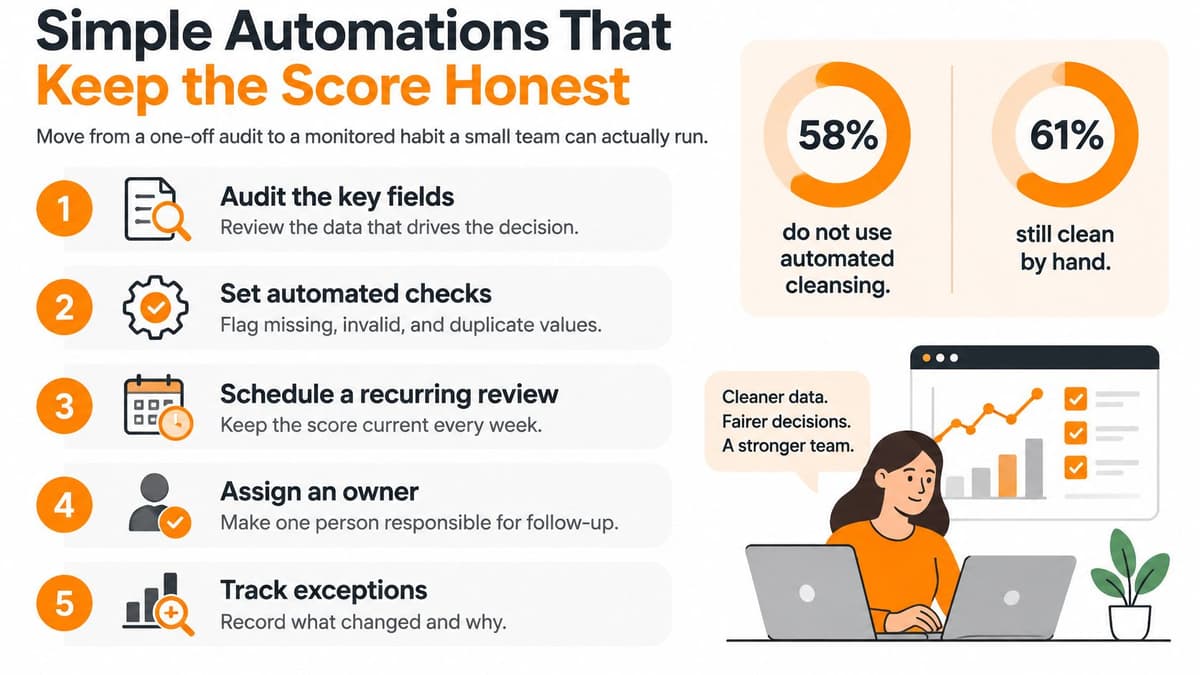
A one-off audit gives you a baseline. Scheduled checks tell you whether the store is still safe to operate after an app update, catalog change, or connector failure.
Formal controls aren't universal even in mature institutions: the OECD's discussion of data governance reports that 23 of 36 OECD countries, or 64%, have formal data-quality assessment standards. For a small Shopify team, the practical answer isn't an enterprise governance program. It's a compact set of checks with clear ownership.
#Schedule checks around operating decisions
Use a spreadsheet with scheduled imports, warehouse queries, or an existing workflow tool. Start with deterministic rules before adding anomaly detection.
- Nightly payment reconciliation, owned by finance or operations: Compare order count and adjusted net sales with payment records. Alert when the unexplained difference breaches the written tolerance, and attach the unmatched transactions.
- Weekday freshness check, owned by the reporting operator: Confirm that yesterday's expected orders arrived before the morning reporting cutoff. Show the latest successful sync and mark incomplete periods clearly.
- GA4 sampling flag, owned by the paid-media lead: Attach report-quality status to the reports used for budget decisions. Require review when their measurement basis changes.
- Product-feed comparison, owned by merchandising: Compare advertised variants with the live catalog. Hold affected items when price or availability disagrees, rather than allowing stale values to keep publishing.
- Weekly identity review, owned by lifecycle marketing: Find duplicate customer identities and invalid contact details. Propagate approved corrections and suppressions to Klaviyo and connected advertising audiences, not just Shopify.
These jobs must look across systems. A successful Shopify export and a successful ad-platform import don't prove that the combined revenue calculation is correct.
#Make alerts useful enough to keep switched on
Every alert needs a named owner, the affected decision, a likely cause, and a next action. Include the last successful run, rule version, and relevant source timestamps. Close the incident only after a recheck confirms that the correction restored reliable reporting.
Don't alert on every null. Alert when a defect changes revenue interpretation, spend allocation, fulfillment, or campaign eligibility. Group related failures into one incident so a broken connector doesn't generate separate messages for every downstream field.
Keep schema and rule changes in the log. If an app renames a field, the operator should see a broken dependency rather than interpret the missing values as a sudden conversion collapse. When evaluating AI-agent use cases, keep consequential actions behind approval until these controls are dependable.
Customer corrections also need a workflow. Log the request date, identify each system containing the record, make the correction, and confirm propagation to email, advertising, subscriptions, and fulfillment. Retain evidence without unnecessarily copying personal information into alert messages.
The European Commission's guidance on individual data-protection rights says organizations should generally respond to correction requests without undue delay, in principle within one month, or explain a refusal. Treat the request as complete only when the relevant downstream records have been checked, not when someone edits the Shopify profile.
#Act on the Three Defects That Move Revenue
Give the next audit a bounded finish line. Pick the three open defects most likely to change revenue, spend, or who receives the next campaign. Don't expand the scope because another export contains an interesting anomaly.
For a store with unresolved reporting disagreements, I would start with these fixes:
- Payment reconciliation: Review the last fortnight, explain settlement adjustments, and isolate the remaining difference against your written tolerance.
- Distinct order IDs: Check the reporting joins and remove unintended revenue multiplication without deleting legitimate line items or refund records.
- Customer eligibility: Suppress confirmed invalid or duplicate contact records from sends, and verify questionable delivery details before fulfillment.
Write the owner, rough dollar exposure, corrective action, and recheck date beside each item. Keep the original failing result so you can compare like with like.
#Recheck before you scale
Recheck those same metrics in seven days. Don't increase budgets on the strength of a disputed revenue number; if Shopify, ads, and email still disagree, resolve the join, reporting definition, or attribution rule before adding another dashboard.
Then reserve a 20-minute Monday review for what changed in orders, customers, traffic, and the product feed. Use a shared sheet to record why each change matters and the next action. You don't need a vendor tool to run that meeting.
The win isn't a perfect inventory of every empty field. It's a small set of verified fixes that makes next week's revenue number safe to act on.
Arlo offers an AI-powered marketing analyst for Shopify merchants, turning sales, traffic, customer, and product signals into a concise weekly report with actions ranked by urgency and dollar impact. Visit Arlo if you want help turning your store's reporting into a clear weekly operating plan, with concrete recommendations for what to protect, investigate, and improve.