Support Ticket Analysis for Ecommerce Founders
By Arthur Falcone · Founder of Arlo
It's Friday, the unassigned count is finally down, and repeat orders still aren't. The tracking bot ate the "where is my order" pile. The team closed early twice this week. Shopify tells a different story: refunds on the new SKU crept up, two subscribers cancelled after a card failed, and second orders didn't budge. A calmer inbox is not the same thing as a healthier store.
Support ticket analysis is how you stop treating that calm as proof. The job is to find which conversations are hiding refunds, cancellations, and lost second orders, then fix the theme that costs the most, not the theme that shouts the loudest.
#Table of Contents
- Why a Smaller Inbox Can Still Lose Revenue
- Rank Ticket Themes by Dollars Not Volume
- How to Run the Analysis in One Sitting
- Set Different Clocks for Buyers and Buyers-to-Be
- Stop Automation Before It Hides the Leak
- Fix the Highest-Dollar Theme This Week
#Why a Smaller Inbox Can Still Lose Revenue
Picture the Friday you are probably in. The help desk looks better than last month. Macros are firing. Average handle time is down. You refresh the sales view anyway, and the repeat-purchase line is flat. Someone on the team says support is "finally under control." The orders say the leaks moved somewhere the queue no longer shows.
Fewer tickets is not a health check. Industry estimates on ticket volume put global ticket volumes up 10-14% year over year from 2023 to 2025, while mature automation programs handled 40-70% of Tier-1 requests. Deflection can look like progress in the same stretch that failed discounts, subscription skips, broken delivery promises, product-quality complaints, and checkout friction keep suppressing conversion and the next order.
#Three buckets the rest of the week uses
Don't sort the inbox by whoever yelled last. Sort it by what the ticket can do to revenue.
- High-volume, low-value questions: Order status, "resend my receipt," password resets. They dominate the count. They're cheap when the tracking page tells the truth.
- Low-volume, high-severity failures: A dead post-purchase email flow, a recharge that never retries, a payment error on a high-AOV cart. Quiet in the report, loud on the P&L.
- Pre-purchase questions: Sizing, shipping speed, and product questions from someone who hasn't paid. These decide whether an order exists at all.
The largest category is often the wrong first project. Where-is-my-order can be half the queue and still be a tracking-page problem. Forty failed recharges can erase more contribution margin than four hundred "any update?" emails. Connect each theme to order value, refund rate, cancellation, repeat-purchase timing, margin, and what that customer was worth on the second order. Then you know what the problem is worth.
Practical rule: Export the last 30 days with order ID, category, refund flag, and CSAT before you rewrite a single macro.
If you can't join a ticket to an order, you're still counting conversations. Counting is how a smaller inbox keeps losing money.
#Rank Ticket Themes by Dollars Not Volume
Don't staff or automate the biggest pile until you know what it costs. Speed and satisfaction gaps show what bad answers do at scale. They are context, not a vanity target for your Tuesday standup.
The Freshworks 2025 customer-service dataset examined more than 1.2 billion tickets and 138 million conversations from over 32,000 companies during January-December 2024. In retail and e-commerce, trendsetting teams resolved tickets in an average of 44 minutes and 16 seconds, reopened 3%, and reached 94.1% customer satisfaction. Aspirational teams took 41 hours and 8 minutes, reopened 16%, and sat at 52.4% satisfaction, roughly 56 times slower, with a reopen rate more than five times higher. That pattern is what incomplete answers, bad routing, and repeat order or delivery issues look like when you stop staring at total ticket count.
#One row per ticket, then a scan
Build a ticket-level table before you debate themes in Slack. Each row needs created time, first response, resolution, reopen count, transfers, channel, category, priority, customer type, order value, a refund or cancellation flag, and whether a second order landed. Then scan, don't average the whole month into one SLA.
Where-is-my-order will usually win the count. It's still cheap if promise dates are honest and the carrier exception is visible. A small failed-recharge or payment-failure set can wipe more margin because each row is a cancelled subscription or a cart that never completed. Estimate last month's exposure as affected orders times average order value times the refund, cancellation, or lost-repeat rate you can see on those rows. Pick one theme from that dollar column. Leave the rest for later.
| Ticket theme | Volume trap | Revenue signal | First fix |
|---|---|---|---|
| Where is my order | Usually the largest pile | Low if dates are accurate; high if promise dates are wrong | Fix the tracking page and carrier exceptions before hiring |
| Failed discount or promo code | Small to medium | Lost checkouts and angry first orders | Audit code logic and the checkout error the customer actually sees |
| Subscription skip or failed recharge | Often quiet | Cancellations and missed second orders | Repair dunning, card-update, and skip flows |
| Delivery exception or damaged goods | Spiky around launches | Refund rate and delayed repeat purchase | Packaging, carrier, and a macro only for the top offending SKU |
| Product quality or sizing | Medium and repetitive | Return rate lined up with reviews | Change the PDP or size guide, not the reply length |
| Checkout or payment failure | Low volume, easy to ignore | High-AOV orders that never complete | Human review; do not auto-close |
| Pre-purchase product or shipping question | Mixed into the same queue as order status | Conversion once replies pass 30 minutes | A separate fast queue, not the WISMO macro |
Say the scan shows 22 damaged-goods tickets on one serum, average order $54, and 14 of those orders refunded. Exposure is about $756 before you count the people who do not reorder. That's a packaging and SKU problem. A longer "sorry" macro doesn't change it. Circle the theme with the largest exposure and take that one into the sitting below.
#How to Run the Analysis in One Sitting
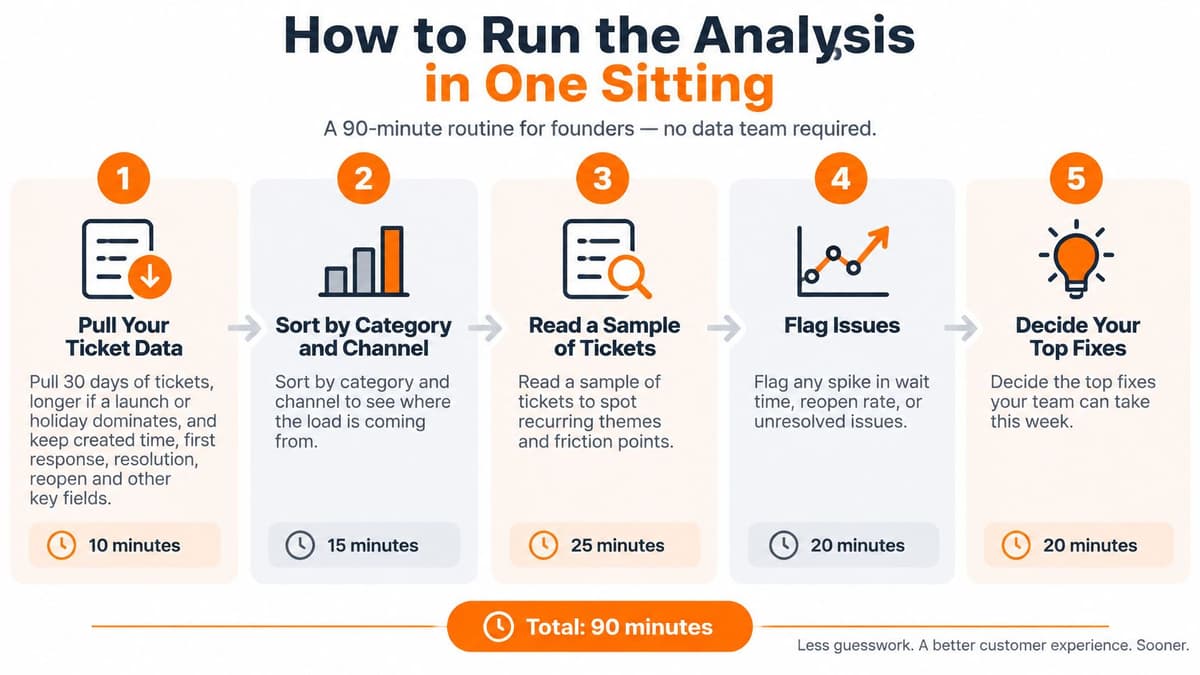
You can do this in about 90 minutes without a data team. Shopify orders on one side, Gorgias, Zendesk, or your shared inbox export on the other, a spreadsheet in the middle. If store analytics already live somewhere else, keep this pass tied to ecommerce analytics so themes sit next to orders instead of in a side doc nobody opens.
A 2024 customer service benchmark reported first-contact resolution of 69.70% in one segment versus 53.89% in another, with resolution times of 3 hours 19 minutes versus 8 hours 17 minutes. Treat those as two different operations, not one blended SLA you paste into a policy page.
#The ninety-minute pass
- Pull 30 days of tickets. Go longer only if a launch or holiday owns the month. Keep created time, first response, resolution, reopen and transfer counts, channel, category, agent, and customer segment. Skipping the holiday filter makes a one-week spike look like your normal operation.
- Join order value, refund, cancellation, and a second-order flag on order ID. Without the dollar column, you'll rank themes by noise.
- Freeze a short taxonomy you'll still use next month: order status, delivery exception, returns and damage, product or sizing, discount, subscription, payment, pre-purchase. A new label every Friday breaks the trend.
- Report median and P90 response and resolution, not the average. A few nightmare tickets drag the mean and make a healthy queue look broken.
- Compute first-contact resolution as tickets solved on the first interaction divided by resolved tickets. Tie a repeat contact back to the original case, or you'll congratulate yourself for creating a second ticket.
- Sort categories by low first-contact resolution plus a high transfer or reopen rate. Read a stratified sample of 15 to 20 conversations, not the angriest thread in the pile.
- Write at most three changes, and only for the theme you already ranked: a macro, a help-center answer, a workflow, or a product or fulfillment fix. A list of twelve "improvements" is how nothing ships.
- Check that faster closure didn't raise refunds, reopens, or lost repeats. Don't rank agents on first-contact resolution alone. Forcing a premature close manufactures the next contact.
- For each frozen category, compute last-month exposure as affected orders times average order value times the refund, cancellation, or lost-second-order rate on the joined table.
- Choose the single theme with the largest exposure, even when its count is small. Limit the three changes to that theme. If order status has a small dollar column, leave it as a tracking-page fix.
A fast close that creates a refund is not a quality win. It's a second invoice for the same failure.
Watch a short walkthrough of the same pass if you'd rather see the columns than reread the list.
Stop when one theme has a dollar figure and three changes. Everything else waits.
#Set Different Clocks for Buyers and Buyers-to-Be
First response, next response, and full resolution are three different failures. A fast hello with a slow answer still creates a second ticket. Blending email, chat, and social into one "we reply within 24 hours" promise hides the queue that's losing the sale.
Ecommerce benchmark medians put email first response above 12 hours, live chat under two minutes, and social responses at one to five hours. Stop averaging those into one SLA. I'd run email replies within four hours, live chat within one minute, and social within one hour, then staff the hours and issue types where the gap to that target is widest. If chat is already fast and email P90 is still next-day, the fix is routing and coverage, not another bot.
#What a slow reply costs while they're still shopping
Tag every ticket pre-purchase or post-purchase. One ecommerce benchmark on reply speed says stores responding within five minutes convert at 21 times the rate of stores responding after 30 minutes. Replies under five minutes line up with 92% satisfaction. Replies at 12-24 hours fall below 50%. That's a buying-process cost. It isn't a help-desk vanity score.
Each week, pull product, shipping, sizing, and checkout questions from people still in the session into the fastest queue. Leave routine order status in the slower email lane. The customer digital journey is where those pre-purchase questions sit, usually mixed into the same view as "where's my parcel."
| Queue | Typical median | Target | Why it changes revenue |
|---|---|---|---|
| Email first response | Above 12 hours | Within 4 hours | Complex and post-purchase issues stall if this is the only SLA |
| Live chat first response | Under 2 minutes | Within 1 minute | Shoppers still on site leave when chat lags |
| Social first response | 1 to 5 hours | Within 1 hour | Public complaints spread while the ticket waits |
| Pre-purchase, any channel | Many teams answer after 30 minutes | Under 5 minutes | 21x the conversion of a 30-minute reply; about 92% satisfaction versus under 50% at 12-24 hours |
| Next response after the first reply | Often unmeasured | Same channel target as the first reply | A fast hello with a slow answer creates the repeat contact |
| Full resolution | Averages hide severe cases | Median and P90 by category | Speed only counts if refunds and reopens do not rise |
Read that table as clocks you're willing to miss in public, not as a reason to abandon a delivery exception that's already a refund risk. A shopper asking about sizing at 8 p.m. is not the same job as a damaged jar from yesterday's batch. Put them in different queues or you'll optimize the wrong one.
#Stop Automation Before It Hides the Leak
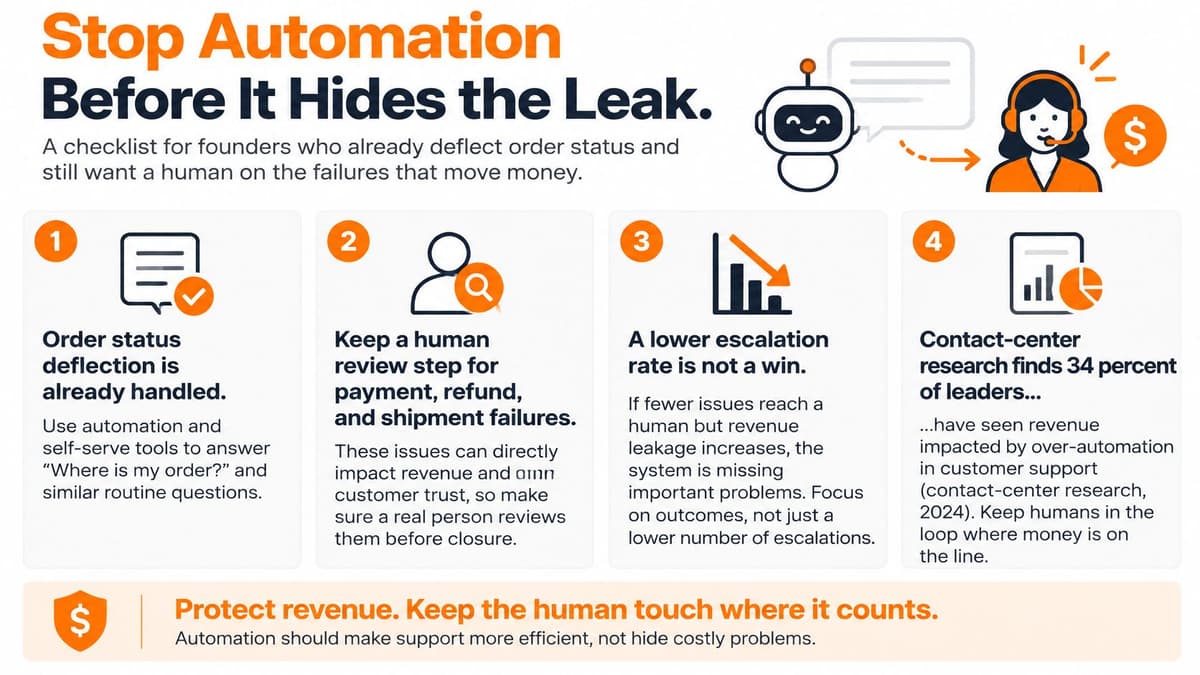
A falling escalation rate can look like progress while the bot closes cases that need a person. Keep routine order-status questions in automation. Route payment failures, delivery exceptions likely to trigger refunds, account-access problems, and suspected fraud to a human when the bot is uncertain.
Contact-center research found that 34% of leaders identify smooth escalation to human agents as a key chatbot capability, while 28% say stronger data protection would significantly increase their trust in AI. Fewer escalations help only when customers still get an answer without repeating themselves or ending up with a refund.
#What to measure instead of "bot resolution rate"
- False containment: The bot marks a case solved, but the customer still lacks a resolution.
- Repeat contacts within seven days: Tie each new contact to the original case. A new ticket ID does not make it a new problem.
- Worsening sentiment: Read the full thread rather than relying on a single CSAT response at close.
- Refunds and chargebacks after a bot close: Pay particular attention to the theme with the largest financial exposure.
- Time to a human: Check whether the agent receives the full thread, order details, and prior macros.
- Results by language, channel, country, and customer value: A single AI-resolution rate can hide weak performance in a specific group.
Review bot-closed tickets in the theme with the largest exposure. Keep category names stable for a month so the trend remains comparable. Retrain using tickets a human resolved. If a customer writes back after a macro closes the ticket, count it as failed containment, not a fresh issue or a productivity win.
If the handoff strips the order history, the agent starts from zero and the customer starts angrier.
Judge automation by revenue protected and customers recovered, not by the share of tickets that never reached a person.
#Fix the Highest-Dollar Theme This Week
Take the theme with the largest last-month exposure and put a dollar figure on it in one sentence you can say out loud. Say 28 failed recharges, a $62 average order, and half of those customers never placed a second order. That's about $868 before you count the margin on the orders that did ship and then got cancelled. Name an owner before anyone asks for headcount or another bot.
Promise-date errors and damaged-goods spikes belong to operations. A failed promo, a sizing miss, or a checkout error belongs to whoever ships the site. Subscription skips and a dead post-purchase flow belong to retention, because a macro does not create the second order. Run one change for two weeks. Compare only that theme on reopen rate, repeat contacts within seven days, refunds, and second orders.
Ecommerce customer service benchmarks put average first-contact resolution at 68%, best-in-class teams at 80% or higher, and 75% as a fair target within six months of optimization. The unresolved slice is the other 32%. Read that slice for returns, delivery exceptions, damaged goods, and product questions, then ship one macro, one help-center answer, or one fulfillment fix. Not all three if you already picked the dollar theme.
Set the two-week result next to revenue versus the four-week average, new versus repeat orders, and contribution after refunds. Those comparisons belong with the rest of your revenue management opportunities, not in a support scorecard nobody in finance reads. The week is finished when that theme has an owner, a dollar figure, and a check date. If the dollar figure didn't move, the close was theater.
Arlo gives Shopify founders a weekly 20 Minute CMO that reads sales, traffic, customer, and product signals and ranks what to fix by urgency and dollar impact. That includes the broken flows and repeat-order leaks your ticket export is already pointing at. Start with a 14-day trial at Arlo and put the next support decision next to revenue, not next to ticket count.