Weekly Progress Report Examples: 7 Shopify Templates
By Arthur Falcone · Founder of Arlo
It's Friday afternoon. Shopify shows revenue, Meta shows attributed purchases, and your email platform has another version of the week's results. You can see sales, but you still can't explain what changed, why it changed, or what deserves attention before the next promotion.
A weekly report should end in decisions, not another round of dashboard browsing. The useful output isn't a longer metric list. It's a short explanation of the commercial change, the evidence behind that explanation, and the action someone will own next week.
That applies whether you're deciding to pause an ad, repair a subscription reminder, or turn product URLs into pages for a landing-page test. Activity belongs in the report only when you connect it to an operating question and a measurable outcome.
- Start with the decision: Does the founder need a quick business read, a diagnosis, or permission to change spending?
- Use the smallest useful format: These seven examples range from a founder snapshot to a ranked action log.
- Separate evidence from interpretation: Label suspected causes and estimated opportunities instead of presenting them as established results.
Each weekly progress report example below includes illustrative sample copy, not a claimed merchant case study.
#Table of Contents
- 1. One-Page Founder Snapshot
- 2. KPI Scorecard with Variance Tracking
- 3. Revenue Bridge Report
- 4. Marketing Channel Efficiency Report
- 5. Conversion and Site Experience Report
- 6. Retention and Lifecycle Report
- 7. Priority Action Log and Experiment Tracker
- Comparison of 7 Weekly Progress Report Examples
- Build the Report Around This Week's Decisions
#1. One-Page Founder Snapshot
Use this report to decide where the founder's attention belongs. Keep revenue, orders, average order value, conversion rate, ad spend, and profit together, with comparisons against the prior week and the equivalent trading period last year.
The snapshot should explain the business before anyone opens a channel dashboard. For profit, state whether you mean contribution profit or accounting profit, and label incomplete cost data as provisional.

#Sample Copy That Supports a Decision
Illustrative founder summary: Revenue increased, but customers bought smaller baskets. Review the promoted product mix before repeating the offer, and ask the merchandising owner to prepare a bundle test before the next campaign.
The useful annotation is revenue up, basket value down. That distinction prevents a founder from approving another promotion based solely on sales growth.
For a subscription coffee store, the equivalent summary might flag cancellations alongside failed payment recoveries. The next action would be to test the payment reminder flow, not immediately discount subscriptions.
- Keep it bounded: Use no more than eight headline metrics, with definitions directly beneath the summary.
- Explain the movement: Pair each important change with a likely driver and a confidence label.
- Close with ownership: Finish with three actions, each carrying an owner and due date.
- Make delivery predictable: Send the report at a fixed weekly time.
Arlo's “20 Minute CMO” format pairs headline metrics with plain-language interpretation. Whether you automate or write the summary yourself, don't let concise become superficial: unresolved discrepancies belong in a short note, not outside the report.
#2. KPI Scorecard with Variance Tracking
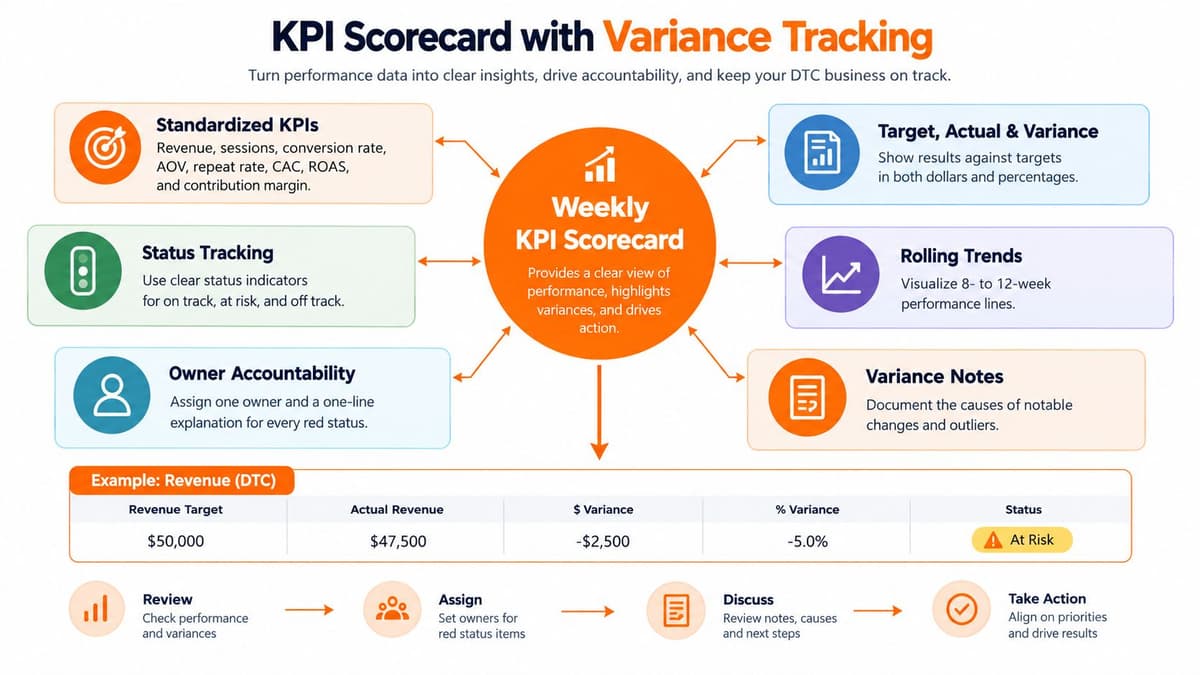
A home goods store hits its weekly revenue target three weeks in a row, and the founder still calls a meeting. Contribution margin per order slipped each time free shipping ran, and no one flagged it because the headline number looked fine. A founder snapshot catches what changed this week. A scorecard catches drift: whether a stable set of measures is moving away from plan while individual weeks look acceptable.
For each KPI, record six fields:
| Field | What to capture |
|---|---|
| Actual | This week's measured value |
| Target | The agreed figure for the period |
| Absolute variance | Actual minus target, in the KPI's own units |
| Relative variance | Variance expressed as a share of target |
| Status | On track, at risk, or off track |
| Owner | The person who must explain deviations |
Use currency variance for monetary measures. For rates, separate percentage-point moves from relative changes: a conversion rate falling from 3.0% to 2.7% is a 0.3-point drop but roughly a 10% relative decline, and the two framings support very different responses.
#Set Targets Before Assigning Status
Choose a compact set covering sales, acquisition efficiency, conversion, and contribution margin, then hold it stable through the quarter. Seasonal context makes a better benchmark than last week's result. A performance benchmarking approach can frame external comparisons, but the report still runs on your store's definitions. A target that ignores product margin or promotional timing rewards the wrong behavior.
Write the status rules down so no one grades their own work generously. "On track" means performance meets the target without breaching a margin or service guardrail. "At risk" flags a trend worth investigating before the evidence justifies intervention. "Off track" obliges the owner to explain the deviation and propose a corrective action, in a sentence or two rather than a defensive essay.
Reset targets at quarter boundaries, not after bad weeks.
Clarity is the whole point of the exercise. 39% of marketers identify making performance data easy to understand as a major challenge, according to the Wunderkind analytics practitioner guide. A scorecard that needs a meeting to interpret has already failed.
#3. Revenue Bridge Report
“Sales were down” isn't a diagnosis. A revenue bridge explains which components changed, so the team doesn't respond to a conversion problem by buying more traffic.
Start with the operating relationship revenue = sessions × conversion rate × average order value. Use matching definitions throughout: session-based conversion, corresponding orders, and an AOV measure based on those same orders.
#Explain the Drivers Without Double-Counting
Estimate the revenue contribution from traffic, conversion, and basket value using a documented calculation order. Then segment the explanation by device or customer type where useful, without adding those overlapping views to the bridge again.
Illustrative bridge copy: Traffic remained broadly stable, but mobile conversion weakened. Bundle purchases supported AOV, partially offsetting the conversion decline. Verify the mobile purchase path before increasing acquisition spend.
For a subscription snack store, a different bridge might show that larger baskets offset weaker new-customer traffic. That supports separate decisions about merchandising and acquisition rather than a blanket conclusion that performance is healthy.
A bridge should reconcile to the sales definition you chose. If it doesn't, show the unexplained remainder instead of forcing the components to fit.
Include a measurement contract covering reporting dates, timezone, currency, refund treatment, attribution, freshness, and known tracking gaps. Record whether the bridge explains gross sales, net sales, or another measure.
This isn't administrative detail: 43% of surveyed marketers report fragmented data prevents a unified performance view, while 35% report attribution confusion, as summarized in Supermetrics' ecommerce reporting guidance.
Keep the arithmetic in the working sheet. Put the driver, likely cause, confidence, and proposed response in the report.
#4. Marketing Channel Efficiency Report
Every ad platform insists its campaigns are performing. Your blended numbers sometimes tell a different story. This report exists for that disagreement: it turns channel data into a spend decision, showing where to protect budget, where to pull back, and where to investigate before next week's dollars go out.
Build it from four inputs: spend by channel, platform-reported return on ad spend, customer acquisition cost, and attributed new-customer revenue. Then add one store-level check: blended marketing efficiency ratio, calculated as total revenue divided by total ad spend.
| View | What it supports | Where it misleads |
|---|---|---|
| Platform ROAS | Comparing campaigns inside a single ad account | It claims credit for orders that other channels influenced |
| Blended MER | Judging whether total revenue justifies total ad spend | It cannot show which campaign drove a given sale |
Read the two views together. When platform returns look strong while blended efficiency and new-customer contribution weaken, check returning-customer mix, attribution overlap, and targeting before approving more budget. A candle brand might respond by cutting an underperforming audience while protecting a proven creative. A pet food subscription store might pause expansion and repair an email flow first.
Keep the mechanics tight so the report stays honest. Require consistent UTM naming before launch and preserve campaign identifiers. Set break-even expectations from product margin and variable costs rather than revenue alone. Agree on test duration and stop rules before results arrive. Change budgets deliberately, one variable at a time, so the next comparison stays explainable.
Don't pause a campaign because one short window looked weak. Check purchase lag, order volume, stock availability, and whether the campaign is still inside its agreed test period. Then write the recommendation the way an operator would act on it: campaign name, proposed budget direction, supporting evidence, and the guardrail that triggers a reversal. "Optimize paid media" is not an executable action.
#5. Conversion and Site Experience Report
Start with the break, not the average. A blended conversion rate can hide a mobile selector that fails, a delivery promise that arrives too late, or a payment option that disappears for one browser. Use the weekly view to locate the exact step where purchase intent drops, then assign one owner a bounded fix.
Track product-page engagement, add-to-cart, checkout initiation, and purchase by device, landing page, and traffic source where the data supports it. Keep cart abandonment separate from checkout abandonment so the team knows which transition it's investigating.
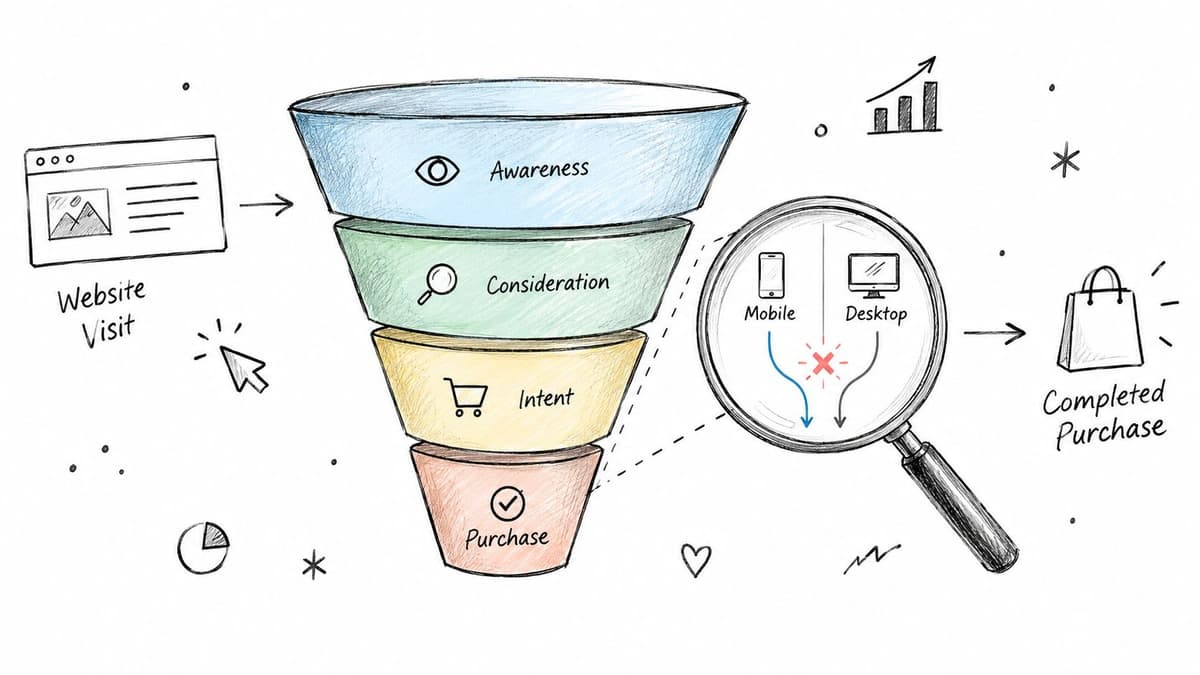
Baymard documents a client whose overall conversion increased 18.7% after checkout recommendations, while mobile conversion moved from 0.89% to 1.9%, in a checkout improvement review. Treat that as evidence for segmentation; store-specific results still need their own baseline.
Illustrative site report: Mobile product views remain healthy after a theme release, but fewer visitors reach checkout. Reproduce variant selection on affected browsers, confirm analytics events still fire, and map the gap with a customer digital journey framework that connects ad promise, product information, shipping, and payment before anyone rewrites the offer.
When the symptom is confirmed, choose the smallest repair that can change the number: restore the selector, clarify delivery timing near the buy button, fix a payment integration, or correct tracking before judging demand. Retest the purchase path after theme or app changes across representative devices and payment methods. Judge high-traffic, low-converting pages by job: an educational page should not automatically carry the same target as a product landing page.
Keep a short context line beside each week: release dates, promotions, inventory changes, and known support tickets. That record prevents the next report from crediting a recovery to the wrong change.
#6. Retention and Lifecycle Report
A retention report earns its place by answering one question each week: are the customers you already paid to acquire still buying, and is the machinery that brings them back still running? Every line in it should support a decision about repeat purchases, subscription recovery, or where lifecycle spend goes next.
That scope is narrower than it sounds.
Say a supplement store opens the week's numbers and sees eligible cart activity but zero sends from its abandoned-cart flow. The job now is inspection: check the trigger, the exclusion rules, and the integration before anyone rewrites a message. Track repeat-purchase rate, churn reasons, flow eligibility, sends, clicks, placed orders, and revenue per recipient, with each attribution definition written down so the same event never gets counted twice.
#Run Operations Weekly, Cohorts Monthly
Flow execution and subscription problems belong on the weekly pass. Customer lifetime value and cohort interpretation need more observation time, and Shopify's ecommerce reporting guidance recommends weekly reviews of repeat purchase behavior alongside monthly assessment of lifetime value and retention cohorts.
The distinction protects you from bad conclusions. A skincare store comparing acquisition channels should only judge cohorts with equivalent observation periods; a group acquired three weeks ago has not had the same opportunity to reorder as one acquired six months ago.
Four checks catch most weekly failures:
| Weekly check | Failure it surfaces |
|---|---|
| Quiet flows | Sends at zero because nobody qualified, which is a different problem from a broken trigger |
| Cancellation reasons | The most actionable exit cause, once subscription cancellations are grouped by reason |
| Commercial email measures | Reliance on opens when clicks, placed orders, and revenue per recipient show the real return |
| Permissions and suppression | Unsubscribe links that fail, or consent data that stops moving between connected platforms |
Compliance sits beside performance in this report. The FTC requires an opt-out mechanism to remain operational for at least 30 days after sending, with requests honored within 10 business days, according to its CAN-SPAM compliance guide.
An unsubscribe failure goes straight to the remediation queue. Fix it immediately and verify the repair, even when the affected campaign looks commercially successful.
#7. Priority Action Log and Experiment Tracker
The action log determines what gets done. It should contain a ranked set of commitments, not every idea raised during the reporting discussion.
For each action, record the observation, proposed intervention, estimated commercial impact, confidence, effort, owner, deadline, and completion evidence. Separate act now, test, and monitor so uncertain signals don't become unnecessary projects.
#Rank Actions Without Inventing Precision
Estimate opportunity from your own traffic, affected orders, margins, and a clearly stated scenario. Label the result as an estimate, and don't convert a broken email's attributed revenue directly into guaranteed recoverable sales.
Illustrative action entry: Repair the post-purchase review flow. Owner: lifecycle lead. Due: before the next scheduled send. Completion evidence: a qualifying test order enters the flow and receives the intended message.
A bedding store could prioritize that repair over a cosmetic page change because the flow is demonstrably broken. A snack brand testing a bundle should retain its original hypothesis, comparison period, and margin guardrails alongside the outcome.
Execution rule: Rank by urgency and credible commercial impact, then use effort to choose between similarly valuable tasks.
Use a strategic planning framework to connect weekly work to business priorities without turning each task into a planning exercise. Keep active commitments limited, and move unselected ideas into a backlog.
Write experiments as: If we change this element, we expect this outcome because of this observed friction. Add a measurable target from your own baseline, a review date, and stop or continue rules.
The accountability principle has broader support: a meta-analysis covering 138 studies and 19,951 participants found that progress-monitoring interventions improved goal attainment, as summarized in this progress-tracking research overview. That supports recorded follow-through, not a guaranteed Shopify revenue lift.
#Comparison of 7 Weekly Progress Report Examples
| Report format | 🔄 Implementation complexity & resources | 📊 Expected outcomes | ⭐ Ideal use cases | 💡 Key advantage |
|---|---|---|---|---|
| One-Page Founder Snapshot | Low; requires a small, consistently defined KPI set and concise weekly commentary | Quick view of performance changes and priority actions | Founders or teams needing a fast weekly overview | Easy to scan and share; limits attention to key metrics |
| KPI Scorecard with Variance Tracking | Moderate; needs stable KPI definitions, targets, owners, and ongoing data maintenance | Shows trends, target gaps, and emerging risks over time | Growth-stage teams with recurring performance reviews | Builds accountability and surfaces gradual metric drift |
| Revenue Bridge Report | Moderate to high; requires reliable traffic, conversion, AOV, and revenue data | Explains revenue changes by driver and estimates each driver's impact | Teams investigating why revenue rose or fell | Connects performance changes to specific business levers |
| Marketing Channel Efficiency Report | High; requires channel data, consistent UTMs, and blended measurement | Identifies inefficient spend and informs budget shifts | DTC brands optimizing paid, owned, and organic channels | Reveals performance gaps that platform-reported metrics may miss |
| Conversion and Site Experience Report | Moderate to high; needs funnel, device, landing-page, and site-performance data | Highlights funnel drop-offs, technical issues, and conversion opportunities | Stores improving checkout, mobile experience, or landing pages | Directs UX fixes toward potential revenue losses |
| Retention and Lifecycle Report | High; requires integrated commerce, email, and subscription data | Tracks repeat purchasing, churn, cohort behavior, and lifecycle revenue | Subscription and repeat-purchase businesses | Detects retention risks and underperforming automations |
| Priority Action Log and Experiment Tracker | Low to moderate; requires owners, deadlines, impact estimates, and experiment follow-up | Turns findings into tracked actions and documented learning | Teams that need to prioritize and execute weekly improvements | Links analysis to accountable work and measurable tests |
#Build the Report Around This Week's Decisions
You don't need seven reporting systems. Start with the founder snapshot and action log, using the same underlying definitions and source data. Add another module only when it answers a recurring question that changes what the team does.
Use the revenue bridge when sales movements are difficult to explain. Add channel efficiency when budget allocation needs attention, conversion reporting when purchase-path performance changes, and lifecycle reporting when repeat purchases or subscriptions deserve closer management.
#Keep the Working Layer Separate
Maintain a working sheet for calculations, reconciliations, and detailed segments. Give the founder a concise decision layer containing the change, likely explanation, confidence, and recommended response.
Carry unresolved measurement issues forward with an owner. If tracking changed, mark the affected comparison as uncertain rather than presenting it as a clean performance movement. Likewise, preserve successful experiments in a “wins to protect” list so a theme update or promotion doesn't accidentally undo them.
- Remove unused metrics: If nobody can name the decision a measure supports, reconsider its place in the weekly summary.
- Preserve definitions: Keep reporting windows, customer classifications, and revenue treatment consistent.
- Close commitments: Begin the next review by checking whether prior actions shipped and whether their expected effects appeared.
- Protect focus: Don't add an analysis module merely because another dashboard makes it available.
Finish with a 20-minute weekly sequence. Reconcile the headline numbers against the agreed sales definition. Identify the largest revenue driver, then verify the associated channel or funnel issue using the relevant module.
Assign up to three actions with named owners, estimated impact, and due dates. Where the evidence is weak, assign a diagnostic task instead of pretending the cause is known; where something works, record what must remain unchanged.
A useful weekly progress report doesn't require certainty about everything. It requires a clear distinction between what happened, what you think caused it, and what the team will do next.
Arlo offers an AI-powered marketing analyst for Shopify merchants through its weekly “20 Minute CMO” report, explaining what changed and ranking actions by urgency and estimated revenue opportunity. Visit Arlo to explore a weekly reporting workflow that connects store performance to concrete next steps.